The system that runs 95% of my content
One idea goes in. It comes back as a script in a Google Doc, an edit plan that knows what b-roll I am missing, five scheduled posts, and a performance row that feeds the next idea. It took me seven months to build. This page is the whole thing, plus a starter project you can download and run today.
Start here
I send a voice note from my phone. The system turns it into an idea, pulls proof from work I have already published, drafts the script, prepares the edit, sends the final video to five platforms, and brings the performance back into the same database.
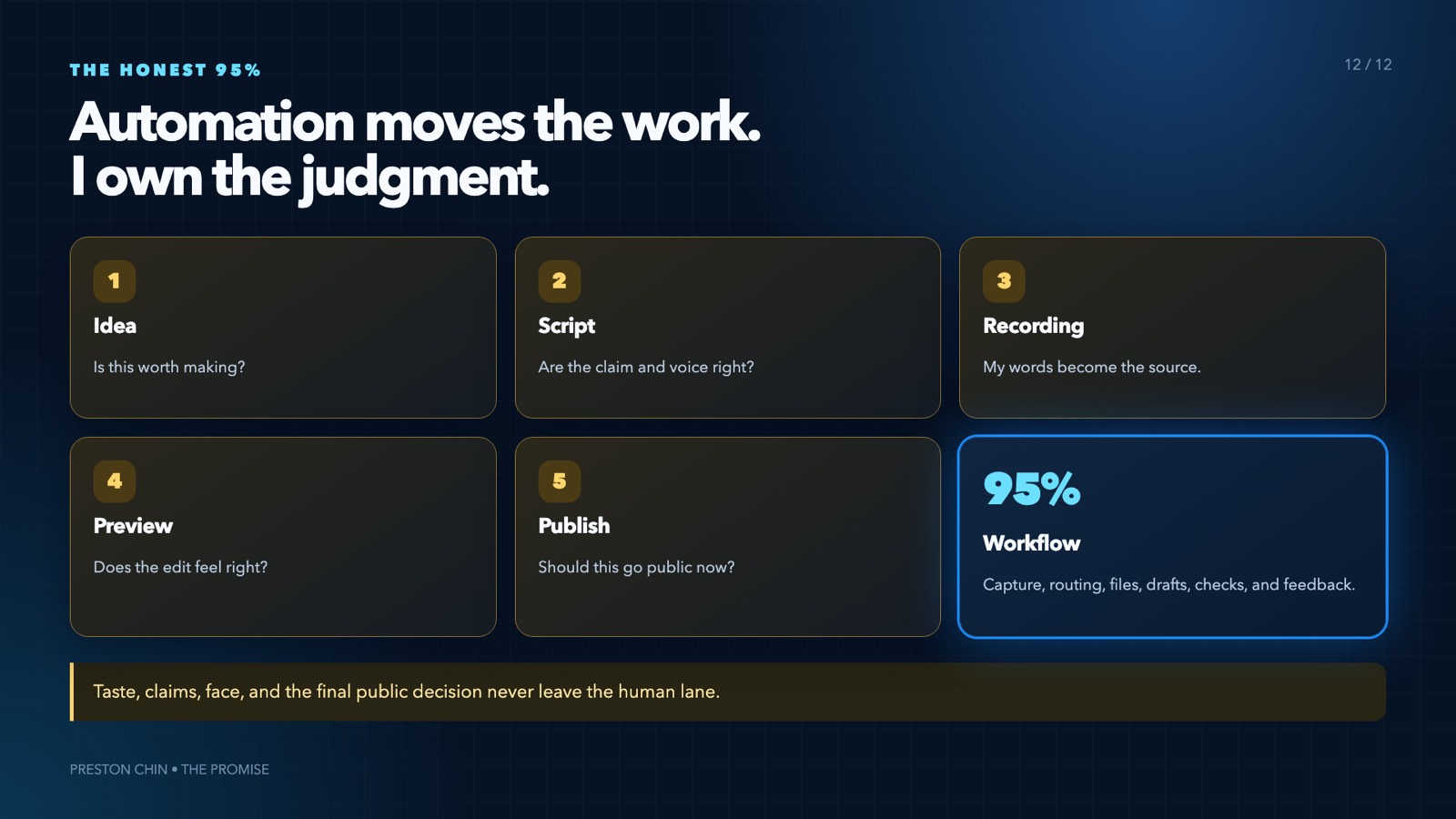
I still choose the idea, approve the words, record the video, and approve the final cut. That distinction matters more than the number in the headline. The 95% is workflow, not judgment. Nothing publishes without me.
Two honest notes before you spend any money on this.
First, the disclosure. Codex is my local operator and it powers my always-on agent. My production setup also runs Claude Code as a second creative worker for some scouting and drafting passes. That second subscription is not required. You can build the entire starter with Codex alone, and I would.
Second, the timeline. This took seven months. Not because any single piece is hard, but because I kept building the next thing before the last thing was proven. If you take one idea from this page, take the build order in section 4. It is the thing I would go back and tell myself.
1. Pick your lane
You do not need my entire stack on day one. There are two real versions of this, and picking the wrong one is the most expensive mistake available to you.
Local. Runs on your computer. Codex, a Google Sheet, Google Drive, and the starter skills. You capture ideas by hand, draft in Codex, and publish manually. This is the correct first build for almost everyone, because it proves the workflow before you pay for a server or social APIs.
Always-on. Adds a small server, Telegram, transcripts, and a publishing tool. The agent runs while your laptop is closed. Build this after one real piece of content has gone through the local loop end to end. Not before.
The reason to be strict about the order is that every problem in the always-on version is a boring infrastructure problem: file ownership, API quotas, stale paths, two processes fighting over the same token. None of those teach you anything about making content. Solve the content workflow first, then go make it survive a closed laptop.
2. What it actually costs
I checked every one of these on 9 August 2026 and linked the official pricing page for each. Prices change, so treat this as a snapshot and click through before you budget.
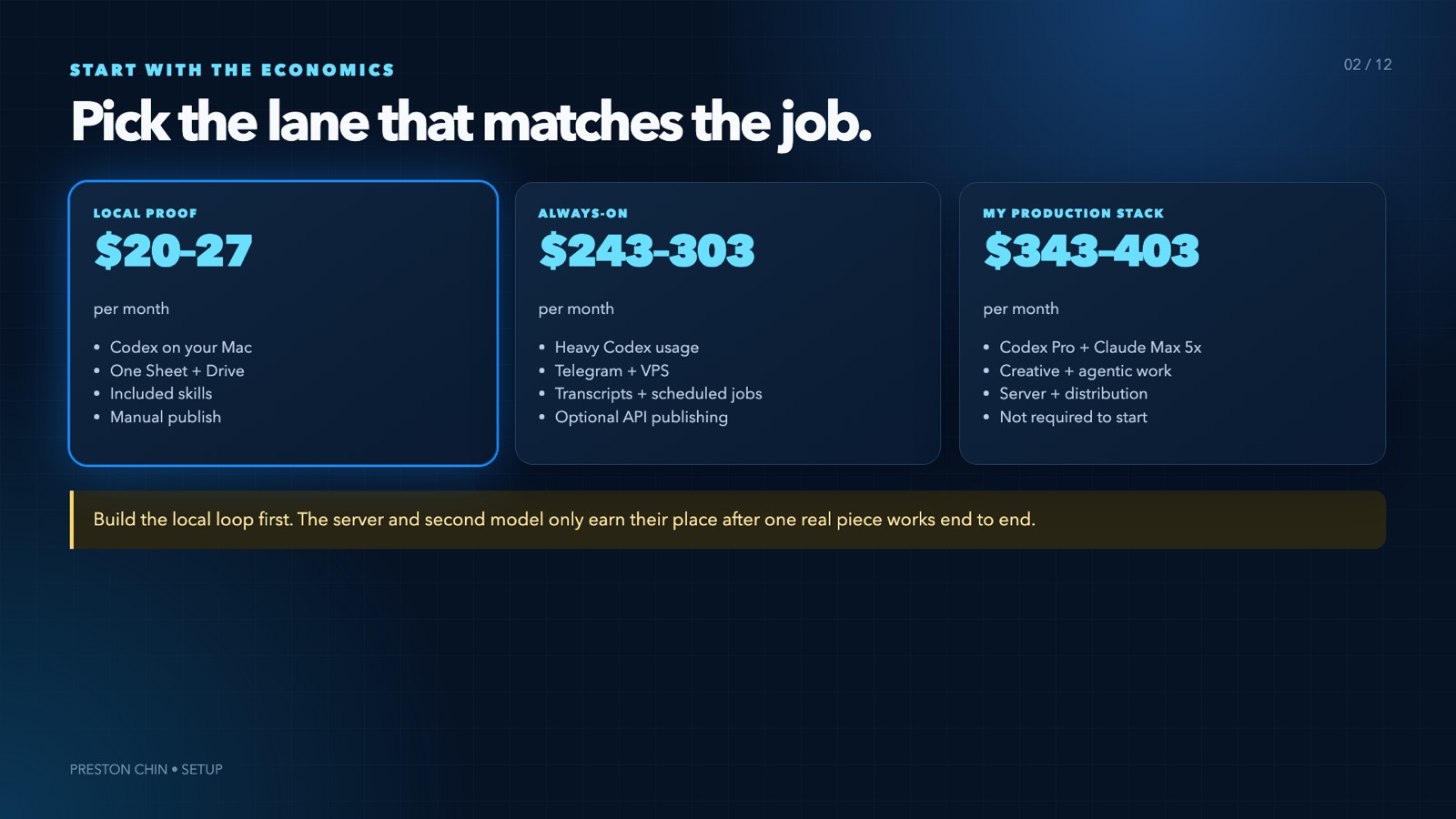
Lane 1, local proof. About $20 to $27 a month. ChatGPT Plus with Codex is $20. A personal Google account is free for testing, or Google Workspace Starter is about $7 per user per month if you want a business address. GitHub Free, Docker Personal, and Vercel Hobby all start at $0 within their terms. Supadata has a free tier for light transcript pulls.
Lane 2, always-on. Roughly $243 to $303 a month. That is ChatGPT Pro at $200 for the heavier Codex tier, Workspace at $7, a Hostinger KVM 1 VPS at $6.49 promotional and about $11.99 on renewal, Supadata at $5 to $17, and Metricool from $25 on monthly billing. If you want to hit Metricool through its API rather than clicking, that needs their Advanced tier at $67, which is what moves the top of that range.
What I actually pay. Roughly $343 to $403 a month. That is Codex Pro at $200, Claude Max 5x at $100 for the second creative worker, plus Workspace, the VPS, Supadata and Metricool. A higher Claude tier adds another $100. HeyGen at $29 is optional and I only use it for Builds videos where I do not record myself.
An older version of this page said the whole thing was "roughly $200 a month." That was true when it was just the model subscription and stopped being true once the storage, the server, the transcripts and the distribution went in. I would rather correct it than leave you planning against a number that no longer exists.
Every pricing page I checked, 9 August 2026
Get a new build-with-AI guide every week
Weekly playbooks on prompting, agents, and content systems — free.
You're in. First email lands shortly.
3. Why this stack
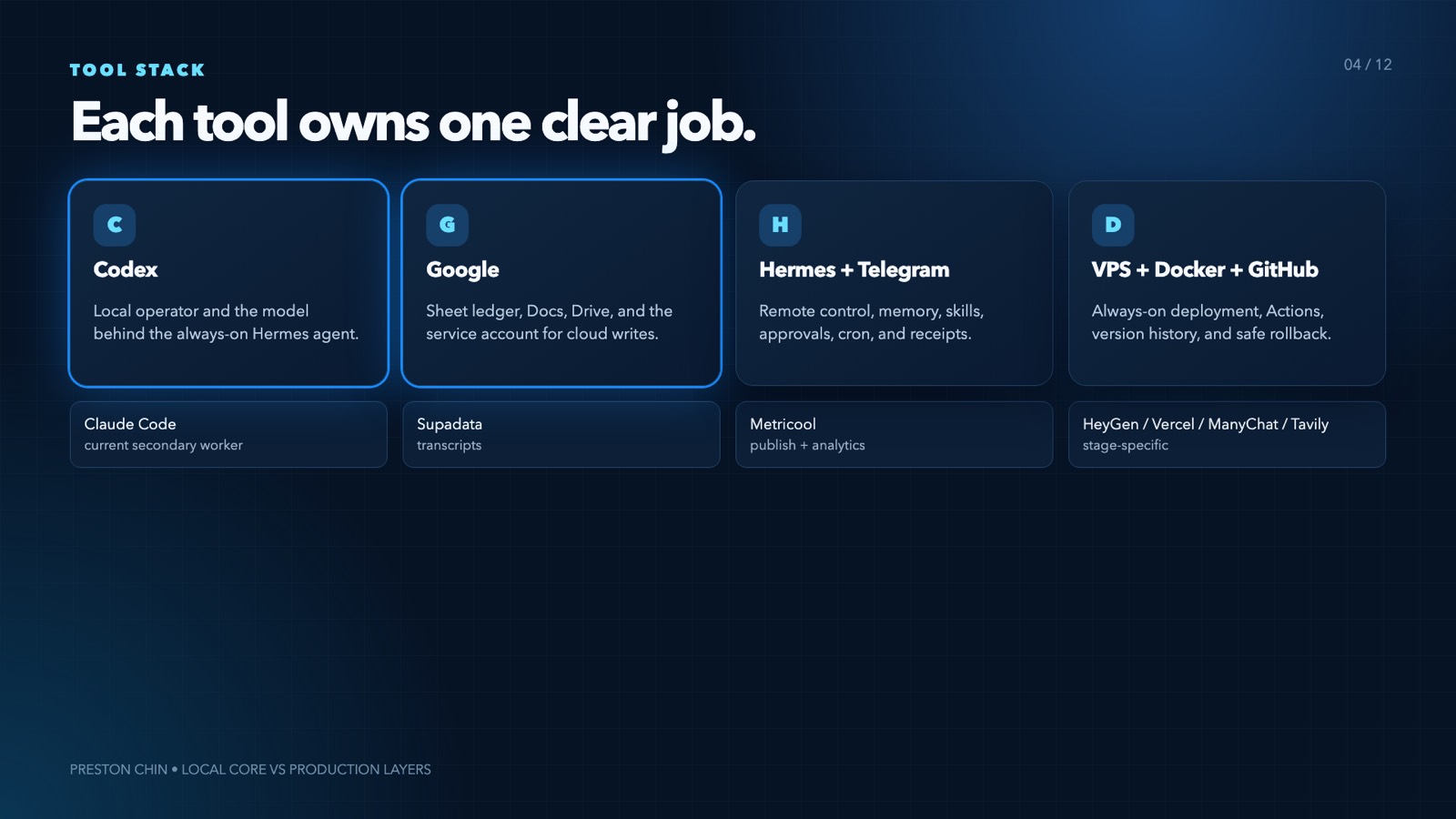
Codex is the operator
Codex reads the project, uses the skills, calls scripts, updates files, inspects screenshots, and verifies its own work. A normal chatbot gives you text. Codex moves work from one stage to the next.
I picked it over a pile of separate no-code automations because the rules live beside the work. When I change a writing rule or an editing rule, the next run reads the same file. The trade-off is setup: Codex needs a clean folder, clear instructions, and approval boundaries. A vague project becomes a vague agent.
Google Sheets is the ledger
One sheet holds every content item, source, doc, asset folder, platform link, and performance snapshot. It is boring on purpose. I can inspect it, back it up, and change tools without losing the history.
I considered a custom database first. The sheet was faster to build and much easier to audit while the process was still changing every week. The trade-off is scale. Sheets has quotas, and rows move while other tools are writing. My write tools find columns by header name and re-find the row by its content ID immediately before every update, which is the only reason this has never corrupted a row.
Google Drive holds the work
Every content ID gets one folder holding the idea packet, script, copy, source media, final media, and thumbnails. The sheet points at the folder. Renaming the folder does not break the link.
Skills hold the process
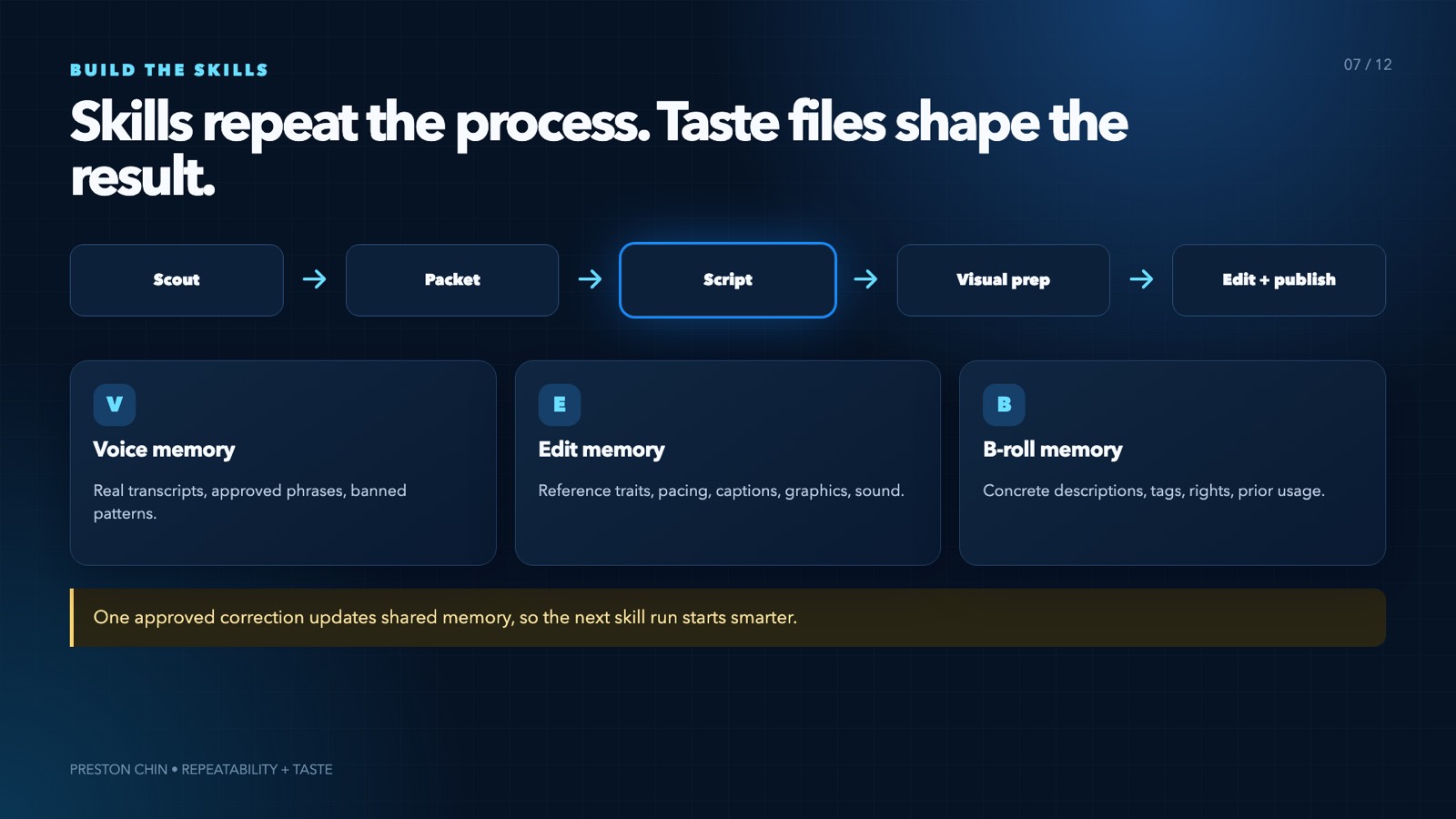
A skill is a short instruction file for one repeatable job. Mine cover scouting, script writing, visual sourcing, production prep, editing, publishing, analytics sync, and weekly review.
The skills do not hold my taste. Separate files hold my hook rules, writing lessons, editing style, voice, and content pillars. That separation is what lets the process stay stable while my taste keeps changing. If you put both in one file you end up rewriting your workflow every time you change your mind about hooks.
Telegram is the remote control
The always-on agent lives in a Docker container on a small VPS, and Telegram is the phone interface. It sends idea digests, accepts approvals, logs voice notes, and reports failures. The starter project ships a simpler capture bot that logs ideas and shows the queue. Codex still does the deep work on your computer.
Metricool handles distribution and analytics
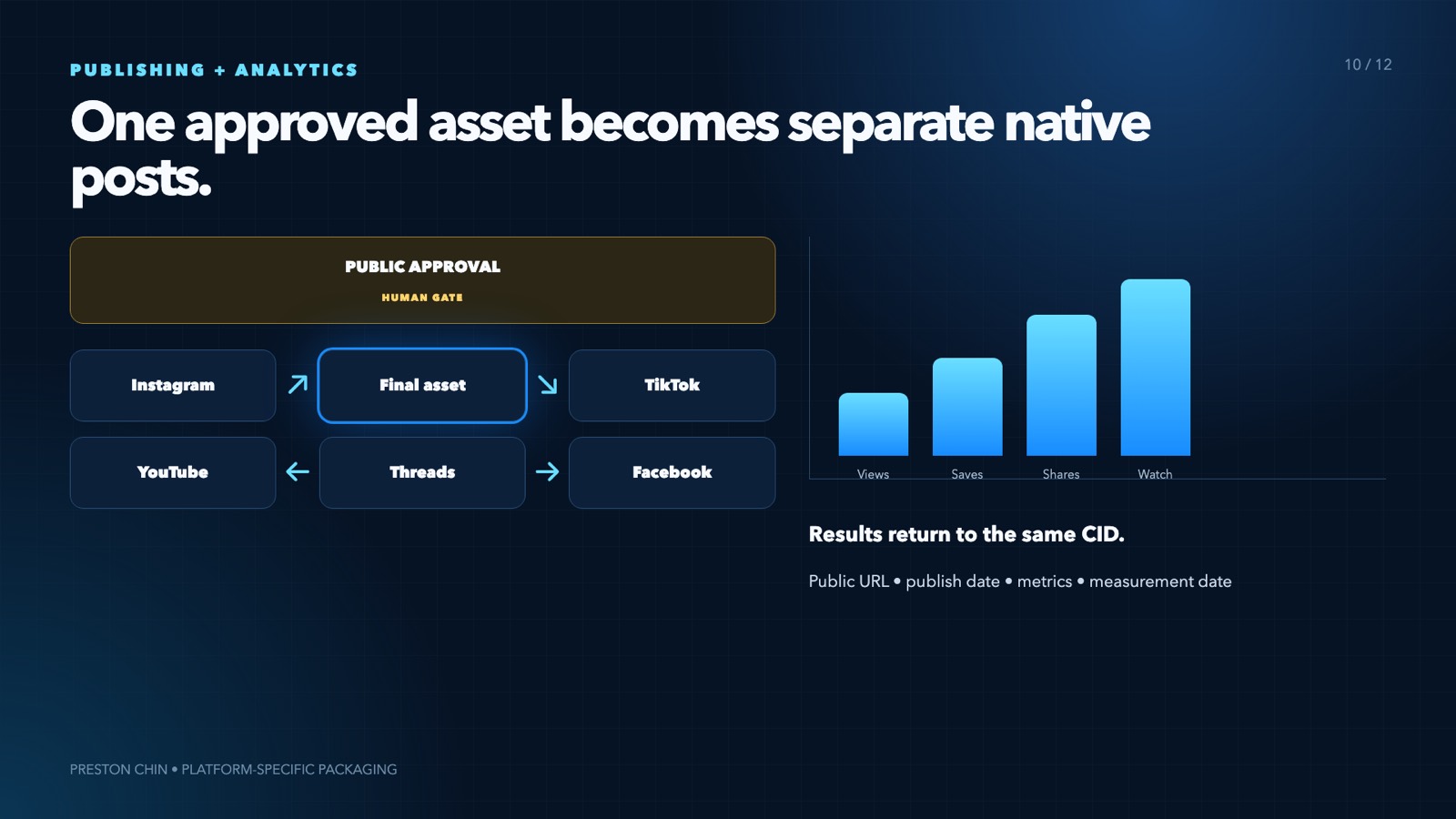
One approved file becomes separate platform posts, one per network, and the results come back into the ledger later. I keep a final approval here. The system can prepare everything. It cannot decide that a bad video deserves to go live.
4. The ten-step build
This is the order. Each step is small enough to finish in one sitting, and each one proves something before the next one starts.
- Open the starter and pick your lane. Local or always-on, per section 1. Two minutes.
- Give Codex your creator profile. Paste the setup prompt below. It asks what you make, who it helps, your platforms, your sources, the decisions you want to keep, and your budget lane. Answer in plain language. Then run
node scripts/personalize.mjsand it builds your creator profile, content brain, voice file, and operating rules from the answers. - Create the one ledger. Upload
content-os-template.xlsxto Drive and open it as a Google Sheet. Seven tabs: Content, Idea Inbox, Sources, Voice, Performance, B-roll, Settings. Do not add automations yet. Put three real pieces into Content and one real source into Sources. The system should prove it understands your work before it writes anything new. - Import your owned work. Start with your best five to ten pieces: transcript, title, URL, publish date, platform. Keep the source attached. My full system holds more than 1,200 pieces now, but I did not need any of that history to prove the first workflow.
- Teach it with reference files. Reference files improve the output faster than another paragraph of prompt. For writing, give it real transcripts and edits you approved. For video, add three to five reference links and name the exact thing you want from each: pacing, framing, captions, transitions, sound. Do not tell it to copy a creator. Tell it which production decision you want to learn from.
- Install the skills. Copy the skill folders into your skills directory. The starter includes capture, idea packet, script, edit prep, publish plan, and weekly review. Each one reads the same profile and reference files, and feedback goes back into those files, so the next piece changes.
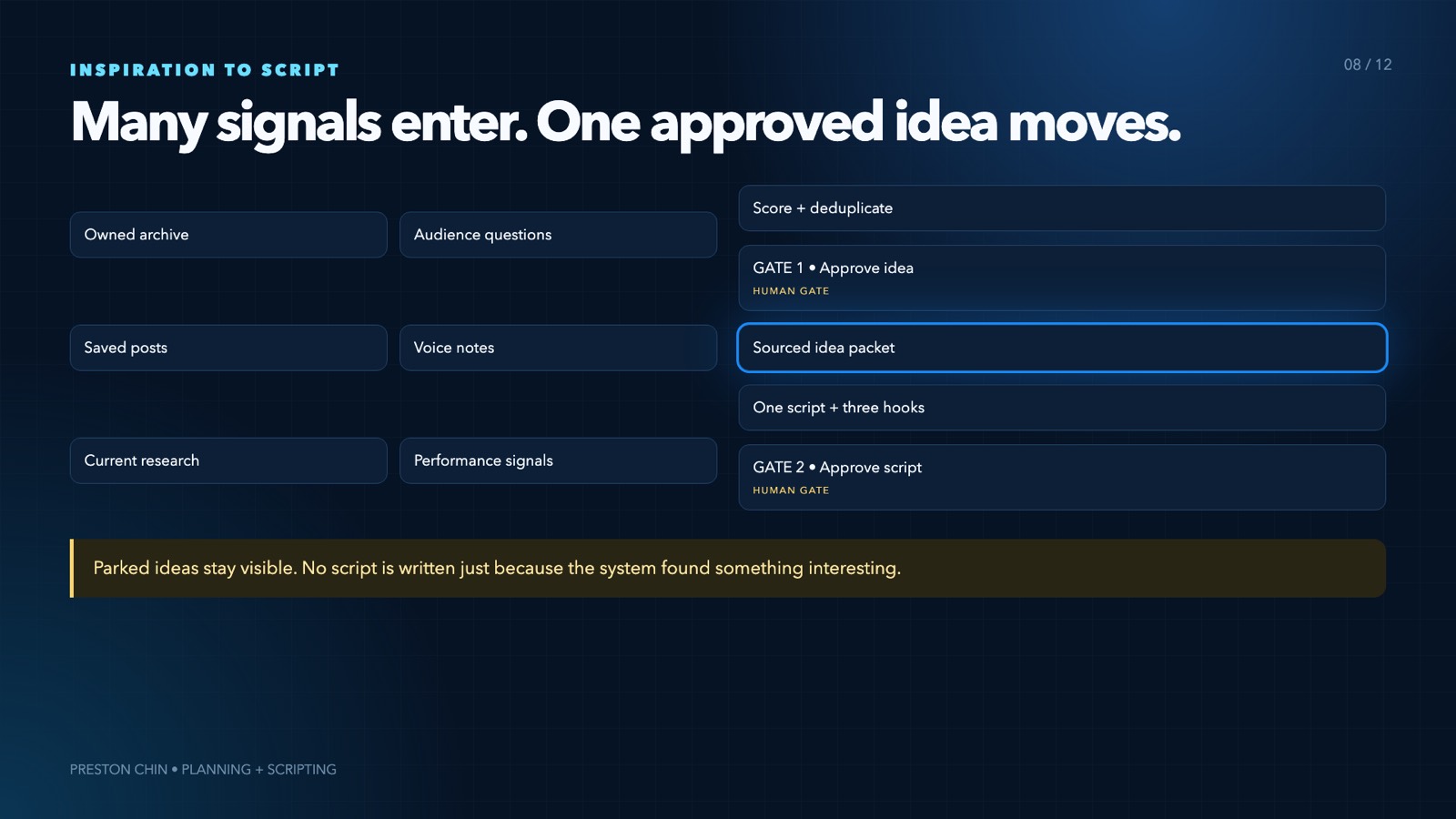
- Capture and approve one idea. Add a row to Idea Inbox, or send
/ideato Telegram. The system logs it. It does not mint a content ID yet. Rank the queue, pick one. This is your first approval gate. - Turn the source into a packet, then a script. The idea packet is an evidence map: claims, examples, numbers, steps, and missing proof, all connected back to the source. Approve the packet, then run the script skill. It writes one script and three hooks, then cuts its own first draft by 20 to 30 percent. Second gate.
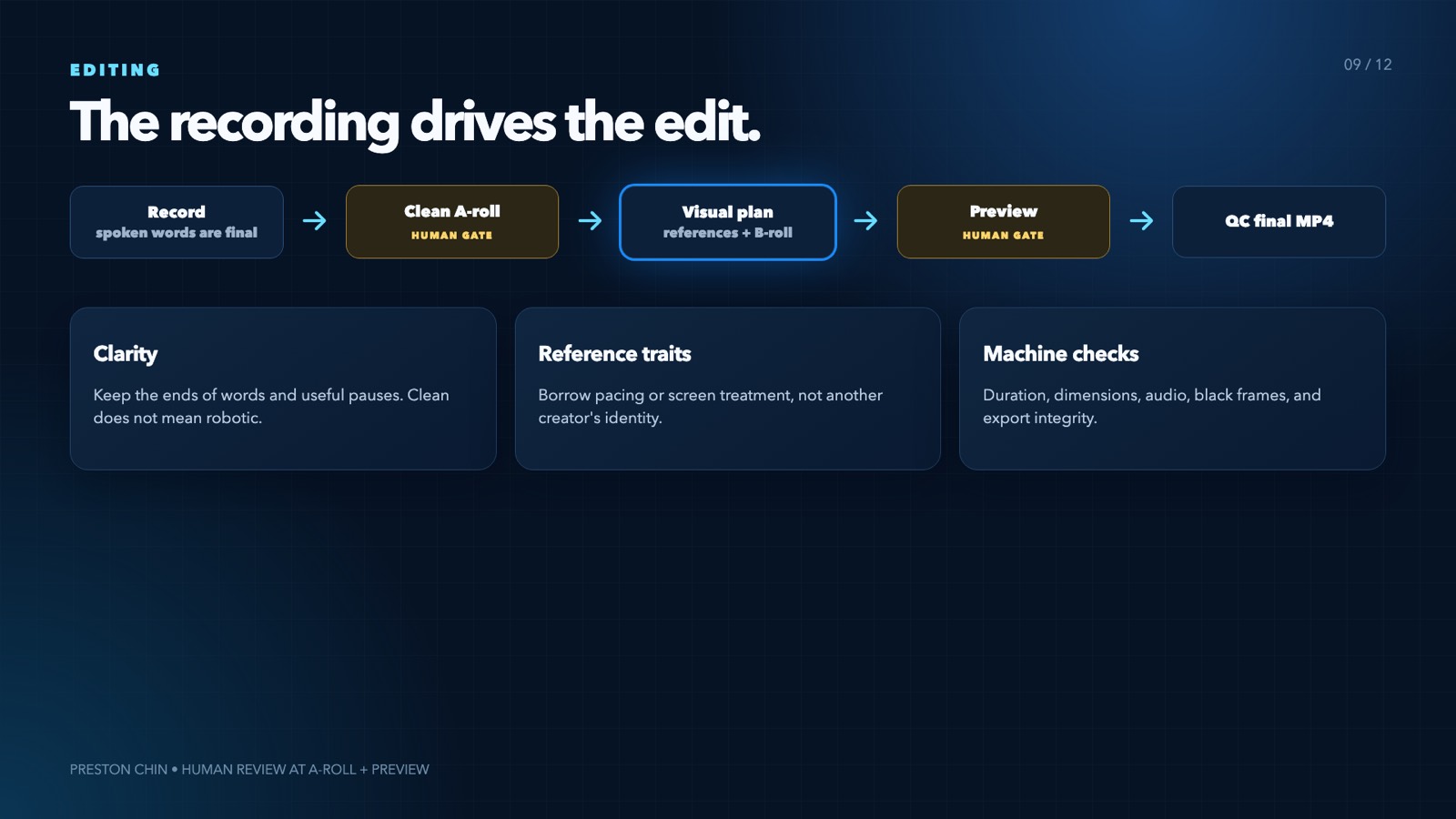
- Record, then prepare the edit. The edit prep skill listens to what you actually said. The recording is final, and the script is context, not a reason to ask you for pickup lines. It builds a visual plan, checks your b-roll library, and lists the screen recordings you still need. Every edit teaches the library, so the tenth video is easier than the first. Third gate is clean audio, fourth is the composed preview.
- Publish, measure, repurpose. The publish skill writes separate captions and requirements per platform, Metricool schedules them, and the results come back to the ledger. The weekly review looks for winners and clear audience signals. A strong short becomes a YouTube video, a newsletter, a carousel, or another short at a different angle. Every repurposed piece gets its own row and its own ID, with the source still attached.
The setup prompt
Open the starter project folder in Codex and paste this in. It is step 2 above.
Help me tailor this Content OS starter project to my content.

Rules:
1. Read README.md, START-HERE.md, TOOL-SETUP.md, ACTUAL-VS-STARTER.md, config/creator-profile.example.json, every file in templates/, and every SKILL.md in skills/ before changing anything.
2. Ask me one short question at a time. Cover my brand, audience, content pillars, platforms, existing sources, weekly cadence, approval gates, editing style, budget lane, and whether I want Telegram.
3. Do not ask for API keys or passwords in chat.
4. Write my answers to config/creator-profile.json.
5. Run node scripts/personalize.mjs.
6. Run node scripts/install-skills.mjs, then show me the generated workspace and explain what each file controls in plain language.
7. Help me add three real content items and one real source to content-os-template.xlsx. Preserve the headers and tabs.
8. Help me choose two to five reference videos. Record the exact trait I want from each one. Do not copy another creator's identity or whole style.
9. Run node scripts/validate.mjs and fix only problems inside this starter project.
10. Walk one idea through capture, idea packet, script, edit prep, publish plan, and weekly review.
11. Stop before any public post, external message, paid API call, or cloud deployment. Ask for my approval before those actions.
12. Keep human gates at idea approval, script approval, recording, preview, and publish.

Start by asking what I create and who it helps.
You are done with the first loop when one real idea has a source URL, a row and an ID, an approved packet, an approved script, a recording or a recording plan, an edit brief built from your reference files, a publish plan that did not post, and a performance row or a date you will measure it.
5. Six things that cost me hours
A wrong handle can poison the library
The first plausible Instagram handle I found for a creator I wanted to study belonged to an unrelated LEGO account. Verify the identity before you import anything. One wrong account corrupts the voice file, the ideas, the scripts, and eventually the analytics, and you will not notice for weeks.
A spreadsheet write can hit the wrong row
Rows move while other tools are working. Find columns by header name, find the row by its content ID again immediately before writing, and read the cells back after the update. I learned this by overwriting one video's script link with another video's.
A scheduled post can quietly become a reminder
Metricool will happily create a reminder that never posts when the autopublish flag is missing. Create one post per platform, set the required fields for that platform, and confirm autopublish is on. A post that silently became a calendar note looks identical to a scheduled post until the day it does not go out.
A dense screenshot is not a good visual
My sheet proves the system exists and is completely unreadable inside a vertical video. Use the real screenshot as a fidelity reference, then rebuild the important part as a clean motion graphic.
Silence detection cuts the end off quiet words
Silence detection is a candidate finder, not a decision maker. It will trim the tail of a word you ended softly. Protect the final word using both transcript timing and audio timing, and keep the natural pause when the two disagree.
An always-on agent fails in boring ways
Mine has gone down from file ownership, API quotas, stale paths, and two processes polling the same Telegram token. Use Docker restart rules, exactly one bot process, a health check, backups, logs, and a failure alert that reaches your phone. None of this is interesting and all of it is required.
6. Go deeper on one part
Several pieces of this have their own full build guide, free, no gate beyond the one you already passed:
- Build Your Own Content Second Brain is step 4 done properly. Every script, blog, and video you have made, in one searchable vault, so the system checks what you have already said before it writes a new hook.
- Build a Telegram Scripting Agent is the always-on capture lane from a blank server to your first script.
- The Hook Decoder and 5 Frameworks for Talking-Head Videos are the reference material step 5 wants. Both are cuts of my own swipe library.
- The Carousel Engine is the repurposing branch from step 10.
- Automate ManyChat with Claude is the comment-to-DM automation that turns a published post into an email subscriber.
Download the starter project
This is the real folder, not a summary of one. It holds the seven-tab workbook, the setup prompt, the personalize and validate scripts, six skill files, the reference templates, and a simple Telegram capture bot for when you are ready for it.
Codex Content OS Starter Project
Unzip it, open START-HERE.html, pick your lane, then paste the setup prompt into Codex.
One thing the folder is careful about, and I want to be upfront about it here too. The starter teaches the same architecture I run, but it is not a copy of my production system. My credentials, my private taste files, my client data and my deterministic sheet bridge stay out of it. The included ACTUAL-VS-STARTER.md lays out exactly what differs, line by line, so you always know which version you are looking at.
Put one real piece of content through it. Then add the capture bot. Then, only once the approval gates feel right, add publishing.