Six Claude Code skills every business owner needs
These are six skills I run in my own business, not demos I wrote for a video. They are below in full, ready to copy, with my private paths and client data stripped out and marked so you can drop your own in.
What a skill actually is
A skill is a markdown file in a folder. That is the whole thing. You put instructions in it, Claude Code reads it when you type the matching slash command, and now the model does that job the same way every time instead of however it feels like today.
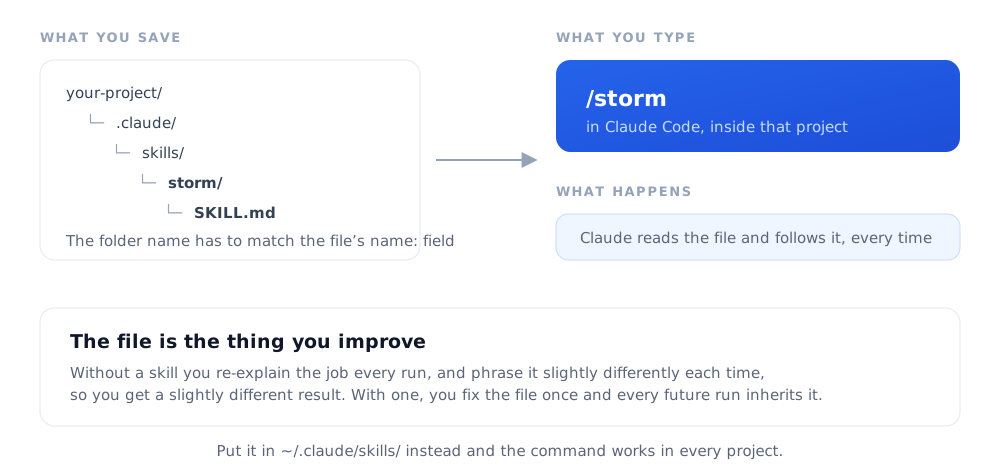
That sounds too simple to matter. The reason it matters is repeatability. Without a skill you re-explain what you want on every run, and you get a slightly different result each time because you phrased it slightly differently. With a skill, the instructions live in a file you can improve. When something comes out wrong, you fix the file, and every future run inherits the fix.
The six below are the ones that changed how I work. They are ordered roughly by how soon a new business owner would get value from them.
How to install one
Pick a skill below, copy its file, and save it at .claude/skills/<name>/SKILL.md inside your project. So the STORM skill goes at .claude/skills/storm/SKILL.md. The folder name has to match the name: at the top of the file.
Then start Claude Code in that folder and type the slash command. If it did not load, the folder name and the name: field do not match, which is the cause about nine times out of ten.
Skills in .claude/skills/ belong to that one project. To use a skill everywhere, put it in ~/.claude/skills/ instead. I keep /storm and /research global and the rest per-project, because the per-project ones need project-specific settings.
Three of the six have a short settings block at the top to fill in once: your site URL, your booking link, your notes folder. They are marked in the files. Everything else runs as written.
Get a new build-with-AI guide every week
Weekly playbooks on prompting, agents, and content systems — free.
You're in. First email lands shortly.
1. /research
Sourced research with a URL behind every claim
Market research, competitor scans, and what people actually say on Reddit. Every claim comes back with a link, and anything that cannot be sourced gets flagged instead of quietly asserted.
---
name: research
description: Run verified web research with citable sources using the Tavily and Perplexity APIs. Returns structured results with a URL for every claim. Use for market research, competitive analysis, or real user feedback from Reddit, forums, and review sites.
context: fork
---

# /research — Verified Web Research

Runs `scripts/research.mjs` to get cited answers instead of confident guesses. The point of this skill is the citation requirement: an answer with no source URL gets flagged rather than accepted.

Note `context: fork` in the frontmatter. Research pulls in a lot of raw text, and forking keeps that out of your main conversation.

## Setup, once

1. Copy `scripts/research.mjs` into your project at `.claude/scripts/research.mjs`.
2. Install the Tavily client:
   ```bash
   npm i @tavily/core
   ```
3. Add both keys to your `.env`:
   ```
   TAVILY_API_KEY=...
   PERPLEXITY_API_KEY=...
   ```
   Tavily has a free tier that is enough to try this. Perplexity is optional. The script degrades to Tavily-only if that key is missing.

## How to use

```bash
node .claude/scripts/research.mjs "your question" [--domains reddit.com,g2.com] [--tavily-only] [--perplexity-only] [--max-results 10]
```

## When invoked as `/research`

`$ARGUMENTS` contains the research question. Run the script, then:

1. Parse the JSON output.
2. Summarize the Perplexity answer, if present.
3. List the top Tavily results with titles and URLs.
4. Highlight any Reddit, forum, or review-site sources. Those are where people say what they actually think.
5. **Flag any claim that lacks a source URL.** This step is the whole skill. Do not skip it.

## Domain targeting

Narrowing the domains is what turns generic search into research.

- Complaints and real experience: `--domains reddit.com`
- Software reviews: `--domains g2.com,trustpilot.com,capterra.com`
- Technical opinion: `--domains news.ycombinator.com`
- Founder discussion: `--domains indiehackers.com`
- Combine them: `--domains reddit.com,news.ycombinator.com,g2.com`

## For competitive research

Run several queries in parallel with different domain targets to build a complete picture. One query gets you the company's own marketing. Four queries across four domain sets get you the truth. Always verify a specific claim by opening the source URL.
This one calls a script. Grab research.mjs from the ZIP below, drop it at .claude/scripts/research.mjs, run npm i @tavily/core, and put a Tavily key in your .env. Tavily has a free tier. The Perplexity key is optional and the script works without it.
2. /storm
Five expert perspectives on one decision
Pressure-tests an idea before you spend money on it. Five lenses argue, the contradictions get mapped, then it grades its own work and names the blind spot none of the five covered.
---
name: storm
description: Run the Stanford STORM research method (Nav Toor's 4-prompt adaptation) on any topic — five expert perspectives, a contradiction map, a synthesis briefing, and a self peer-review. Use when you want rigorous multi-angle research, or to pressure-test an idea, decision, or piece of positioning. Invoke as /storm <topic>.
---

# STORM — multi-perspective research on any topic

Credit: this is **Nav Toor's** (@heynavtoor) 4-prompt adaptation of Stanford OVAL Lab's STORM method (NAACL 2024). Viral post: https://x.com/heynavtoor/status/2067281413368611267 — the thinking is his; this skill just automates running all four passes in one sitting.

STORM = **S**ynthesis of **T**opic **O**utlines through **R**etrieval and **M**ulti-perspective questioning. The whole breakthrough: don't ask one question. Ask five, from five different experts. Multi-perspective questioning catches the blind spots a single prompt never sees.

## Input

`$ARGUMENTS` is the topic (and optionally your role, e.g. "…for a solo founder").

- If no topic was given, ask for one, then proceed.
- If the topic is a decision or an idea to pressure-test, keep that framing. STORM is as good for "should we do X" as it is for "explain X."
- Infer the user's role from context (their project instructions, the conversation). If it genuinely changes the actionable advice and you can't infer it, ask one short question. Otherwise assume and state the assumption.

## House rules (apply throughout)

These layer on top of Nav's method:

- **Lead with the counterargument.** Don't soften. The skeptic and historian lenses are load-bearing, not garnish.
- **State confidence** on every material claim (high / medium / low), and say *why* it's not higher.
- **Never fabricate.** No invented stats, sources, names, or URLs. If you'd need a source you don't have, say so. That's the peer-review pass's job to flag.
- **Specifics over vibes.** Real names, real numbers, concrete examples. If a perspective can't get concrete, say what it would need.

## Run all four phases, in order

Work through the four passes below and present the output of each. Don't ask the user to paste anything between passes. Run the whole chain, then hand back the full briefing. If a topic is heavy, use subagents for the five perspectives so each gets real depth.

### Phase 1 — The Multi-Perspective Scan

Simulate 5 experts on the topic. For each: their core position in 2 sentences, the strongest evidence for their view, and the one thing only they would tell the user.

1. **The Practitioner** — works with this daily. What do they know that academics miss? What practical realities get ignored?
2. **The Academic / Analyst** — has studied it for years. What does the actual evidence say? Where does it contradict popular belief?
3. **The Skeptic** — thinks the mainstream view is wrong. What's the strongest counterargument? What do proponents conveniently ignore?
4. **The Economist** — follows the money. Who profits from the current narrative? What incentives shape it?
5. **The Historian** — has seen the pattern before. What historical parallels exist, and how did they play out?

### Phase 2 — The Contradiction Map

From the five perspectives:
1. Where do two or more directly contradict each other? Name each clash with the specific claims involved.
2. Which perspective has the strongest evidence? The weakest? Why?
3. The one question that, if answered, would resolve the biggest contradiction.
4. What every perspective agrees on (even opponents). Likely true.
5. What NONE of them addressed, the blind spot in the whole field. Often the most valuable finding.

### Phase 3 — The Synthesis

Pull it together into a briefing:
1. **One-paragraph summary** — brief a CEO who has 60 seconds and needs the nuance, not the headline.
2. **5 key findings**, ranked by reliability, each tagged with which perspectives support and challenge it (and a confidence level).
3. **The hidden connection** — one non-obvious link between findings that only shows up across all five lenses.
4. **The actionable insight** — given the user's role, what should they actually DO differently? Be specific.
5. **The frontier question** — the one unknown that, if answered, would change everything.

### Phase 4 — The Peer Review

STORM's known weakness is that it doesn't self-critique. Fix that:
1. **Confidence scores** — rate each key finding 1–10 for reliability, with a one-line reason.
2. **Weakest link** — the claim you're least sure of, and what would verify it.
3. **Bias check** — which perspective dominated the synthesis? Did one voice crowd out the others?
4. **Missing perspective** — a 6th lens that would change the conclusions.
5. **Overall grade** — what a Stanford professor would give this briefing, and what they'd say to fix.

## Output

Present the four phases as a single flowing briefing (headers per phase). End with:
- The **actionable insight** and **frontier question** pulled to the top of a short "Bottom line" block, so the user gets the payoff without rereading.
- An offer to (a) go deeper on any one perspective, or (b) render the briefing as a standalone HTML page.

Keep the writing human. Vary sentence length, no filler, no "it's not about X, it's about Y" scaffolding, no em dashes.

<!-- OPTIONAL: if you keep a writing-rules file in your project, point at it here. -->
<!-- Follow `.claude/rules/writing-rules.md`. -->
Credit where it is due: this is Nav Toor's four-prompt adaptation of Stanford's STORM method. The thinking is his. The skill just runs all four passes in one sitting. There is a longer write-up of it on its own page.
3. /site-audit
Every page, desktop and mobile
Screenshots every public page at two widths, then audits titles, descriptions, canonicals, schema, sitemap leaks and dead CSS. The screenshots catch what a human sees, the head audit catches what a crawler sees.
---
name: site-audit
description: Boot the local dev server, screenshot every public page (desktop + mobile), and run a full design + SEO audit — per-page heads, taxonomy health, internal linking, CSS health, live robots/sitemap/redirect checks. Use when you say "/site-audit", "audit the site", or before and after a redesign ships.
---

# Site Audit

Fill these in once, then never again.

```
SITE_URL      = https://www.example.com      # your live site, with the canonical host
DEV_URL       = http://localhost:4321        # whatever `npm run dev` prints
CONTENT_DIR   = src/content/blog             # where your posts live, if you have a blog
REPORT_DIR    = docs/site-audit              # where the report and screenshots land
```

## 1. Boot + screenshot

1. `npm run dev` in the background. Wait for the local URL to print.
2. Screenshot every public page at desktop (1440px) and mobile (390px) widths using Playwright. Install Playwright in a scratch directory, not the repo:
   ```bash
   cd /tmp/site-audit && npm init -y && npm i playwright && npx playwright install chromium
   ```
   The screenshot script should: block analytics and pixel requests so they don't fire on your own audit, hide any dev toolbar, auto-scroll each page to defeat lazy-loading, then write a full-page PNG.
3. Keep a list of routes in the script and update it when routes change. Keep a 404 probe in the list so you always confirm the 404 page renders.

## 2. Live-site checks

Production truth beats local config. Always test the canonical host, because a redirect from the apex domain strips auth headers and will give you a misleading result.

```bash
# apex should redirect to your canonical host
curl -sI -o /dev/null -w "%{http_code} -> %{redirect_url}\n" https://example.com/

curl -s $SITE_URL/robots.txt

# your sitemap must not contain private, thank-you, checkout, or gated URLs
curl -s $SITE_URL/sitemap-0.xml | grep -o '<loc>[^<]*</loc>' \
  | grep -iE 'dashboard|thank|checkout|access|admin|account'   # must return NOTHING

# gated pages should not be publicly readable; check the X-Robots-Tag too
curl -s -o /dev/null -w "%{http_code}\n" $SITE_URL/dashboard
```

## 3. Sub-audits

Run these as parallel background agents. Each one is independent.

- **Per-page SEO heads.** For every public page collect: title (and its length), meta description, canonical, OG image, JSON-LD, H1, noindex flag, internal links in and out. Invariants that must hold: every canonical is the absolute HTTPS canonical-host URL with a consistent trailing slash and no query string; the sitemap contains zero private or post-conversion URLs; every post-conversion page (thank-you, access, receipt) carries `noindex`; the homepage carries WebSite and Person or Organization schema; blog posts carry Article schema.
- **Taxonomy and content depth.** Parse frontmatter in `CONTENT_DIR`. Report posts per topic, posts with zero topics, false-positive topic matches, title and description length stats, and whether drafts are leaking into the blog index or the RSS feed. Check the draft filter in both places, they are easy to fix in one and forget in the other.
- **CSS health.** For each top-level class in your global stylesheet, run a boundary-aware grep across `src/` and `CONTENT_DIR` (a token counts only when it is not preceded or followed by `[-\w]`). Before declaring anything dead, check for dynamic construction: class lists built in template literals, conditional class helpers, and JS `classList` calls. Quantify duplicates.

## 4. Report

- Write findings to `REPORT_DIR/README.md`, overwriting the last run. Screenshots stay in `REPORT_DIR/assets/`.
- Tag every issue P0 to P3, say which thing it hurts (SEO, understanding, trust, or conversion), give the exact `file:line`, and give the specific fix. A finding with no file and no fix is a complaint, not a finding.
- Apply on the spot ONLY: meta tags, robots and sitemap exclusions, typos, and CSS proven unused. After applying, verify: brace balance, `npm run build`, then re-screenshot the homepage, an interior page, and a blog post and compare against the before shots.
- Everything structural is spec-only until you approve it.
- Never touch: payment or checkout flows, webhooks, gated routes, API routes, or middleware.

## Why the two-pass structure matters

The screenshots catch what a human sees. The head audit catches what a crawler sees. They disagree more often than you would expect, and the disagreement is usually where the real bug is.
4. /assessment-report
Research a prospect, draft a custom report
Walks a prospect funnel as a buyer, then builds a report of the automations you would set up for them, themed in their own colors, with an internal page proving every claim.
---
name: assessment-report
description: Research a prospect's business the way a buyer would, then build a custom report of the automations you would set up for them, plus an internal sources page that proves every claim. Ships an unlisted HTML report themed in the prospect's own colors and drafts the follow-up email. You review everything before anything is sent. Trigger "/assessment-report <company or lead email>".
---

# Assessment Report — a custom deliverable that earns the call

The promise you are fulfilling: your outreach said something like "here are the top automations I would set up for a business like yours, yours to keep free of charge." This skill over-delivers on that, proves you did the homework, and earns a call without a pitch.

It works because almost nobody does the research. A generic audit gets deleted. A report that quotes their own pricing page and describes what happened when you actually walked their funnel gets a reply.

## Fill these in

```
YOUR_NAME       = Your Name
YOUR_EMAIL      = you@example.com
BOOKING_LINK    = https://your-scheduler-link
TEST_EMAIL      = a real inbox you control, used for lead-magnet signups
CRM             = wherever you track leads (a sheet, Airtable, a CRM)
REPORT_DIR      = src/pages/assessments        # in your own site repo
```

## Hard rules

- **Never fabricate.** Every number, quote, and page claim must come from something you actually opened. If a source can't be verified, drop the claim or label it plainly as an assumption.
- **Never** create accounts, enter payment details, or submit a sales-contact or demo form on the prospect's site. That pings their sales team with a fake lead and it is the fastest way to burn the relationship. Newsletter and lead-magnet email captures ARE fine, using `TEST_EMAIL`, so you can inspect what actually gets delivered.
- The client-facing report contains **no** source links, no tech-stack callouts, no confidence jargon. Evidence lives on a separate internal page.
- The skill sends nothing. You review the report and the drafted email, then send it yourself.

## Phase 1 — Research

1. **Business map.** Their main site, product pages, pricing, about and team page (founders, roles, headcount), how-it-works. Pull exact prices, program lengths, guarantees, and stated delivery promises. Wording like "weekly review" or "90-day check-in" is future automation grounding: they have already told you what they do by hand.
2. **Founder background.** Search the founders by name. Career history tells you what pain they personally feel. Someone from a sales career feels deal friction. An ex-HR leader feels people-ops friction. Pitch the pain they already believe in.
3. **Funnel walk, as a buyer, in the browser.** Start at the homepage. Click every primary CTA. Note each step: what gets collected, where it dead-ends, and what a not-ready-today buyer is left holding. Do the lead magnets with `TEST_EMAIL` and record exactly what arrives: the from-domain, whether a sequence follows, how long it takes. Screenshot the key steps.
   - Re-observe animated UI before calling anything broken. A typing animation looks exactly like a truncation bug in a screenshot.
   - Check the page source for ad pixels. Paid traffic entering a leaky funnel is a headline finding, not a footnote.
4. **Social reach scan.** Three sources, in priority order:
   - Their **rendered** site footer. JS-rendered links are invisible to a raw-HTML grep, so use a real browser. The footer is the authoritative list of official handles, and a dead or wrong link there is itself a finding.
   - Direct page visits for follower counts. A direct visit beats a search snippet every time. Snippets go stale by an order of magnitude.
   - Search snippets only as a fallback, labeled approximate.
   Cover: founder personal profile (usually their biggest asset by far), company pages, and every network their footer claims.
5. **Log everything as you go.** URL plus a one-line note of what it established. You will not remember later which page proved which claim.

## Phase 2 — Choose the automations

Pick five. Frame every candidate through four questions:

- **Who is the primary customer?** The individual, the employer, the enterprise? Getting this wrong makes the whole report feel generic.
- **How does it work today, manually?** Ground this in an observed page or a promise they published.
- **What does the automation do?** Two to four plain sentences.
- **What is the payoff?** One matter-of-fact line. No drama.

Selection principles:

- Lead-gen and nurture belong in scope when the funnel walk showed the leak, especially if ad pixels are present.
- If the prospect sells automation software themselves, propose the fix running on THEIR tool, by name. Anything else reads as ignorant.
- A speed-to-lead or qualification-call agent belongs whenever the core offer costs four figures or more. Someone cold does not pay $5,000 off a web page.
- Delivery-side automations grounded in their own published promises (weekly reviews, reports, SLAs) are the strongest cost-side picks, because they already committed to doing the work.
- Kill anything that produced only generic value during the walk.

## Phase 3 — Voice

Plain English. Active verbs, specific nouns, short sentences. "The quiz collects an email and sends people to the $5,000 page." Never fluffy abstractions, never passive constructions, no em dashes. State numbers with their scaling assumption: "At 100 members this is 6 to 8 hours a week. Even at 40 it is likely your largest review cost."

## Phase 4 — Build three pages

All unlisted, all `noindex, nofollow`, in `REPORT_DIR`.

1. **`<slug>.astro` — the client report, themed in the PROSPECT's colors.** Pull their palette off their own site: background, accent, button color. Structure:
   - Header: "Prepared for `<First Name>` · `<Company>`", headline "Five automations I'd build for `<Company>`", and a two-sentence sub explaining that you went through their site and funnels the way a buyer would, and that this is theirs to keep either way.
   - "What I did first": the funnel walk, three to five first-person factual steps.
   - "Your reach today, from the outside": the socials table plus a plain read of it. Label counts with the month and year a visitor would see.
   - The five automation cards: number, tag, title, who it serves, how it works today, what you would automate, payoff.
   - "What I'm assuming": three to five bullets, ending with "If any of that is wrong, tell me and this list gets better."
   - CTA box: say plainly that the list is not comprehensive, it is a few hours studying the business from the outside, and a short call would let you tailor it. Then `BOOKING_LINK` and your signature.
2. **`<slug>-sources.astro` — internal.** Badge it "INTERNAL, DO NOT SHARE". Every source URL and what it established, the funnel-walk log, the email observations, the social scan including corrections, per-automation rationale with confidence, and the ideas you rejected and why.
3. **`<slug>-storm.astro` — internal.** Run the `/storm` skill on your own draft, grounded in the researched facts. Apply what it finds before you review. The page holds the five lenses, a claim-by-claim fact-check table, the verdict, and what changed.

## Phase 5 — Deliver

Present three URLs, the key findings in plain text, and a drafted follow-up email with the report link inserted. Edit, approve, send yourself. Then update the lead's row in `CRM`.

### Follow-up email template

> Hi `<FirstName>`, sounds good. I spent the past few hours studying your business and going through your funnels before putting together this custom report for you.
>
> `<REPORT URL>`
>
> They're yours to keep either way. I just ask that you share your feedback after reviewing it.
>
> And if any of them are worth a deeper dive, you can book time with me HERE. In the call, I'd aim to understand your biggest bottlenecks and we'd come up with a more refined plan.
>
> `YOUR_NAME`

Hyperlink "HERE" to `BOOKING_LINK`.
5. /process-inbox
Sort raw notes into actions, ideas, references
Reads everything you captured, classifies it in one table you approve in a single pass, then files it. The point is that every action links to a system you actually run.
---
name: process-inbox
description: Daily processing run for your notes vault. Reads everything in the inbox, classifies each capture as ACTION / CONTENT FUEL / REFERENCE / SKIP against your active projects and built systems, gets one-pass approval, then routes everything to where it belongs and clears the inbox. Use when you say "/process-inbox", "process my inbox", or "what's in my inbox".
---

# /process-inbox

Turns raw captures into actions, content fuel, and reference notes. Target: inbox to zero in about five minutes of your time.

This assumes a vault with these zones. Rename them however you like, just keep the shape.

```
VAULT = /path/to/your/vault

  00-inbox/      raw captures land here from anywhere
  10-notes/      your own words, one idea per note
  20-projects/   actions, grouped by project
  30-mocs/       topic indexes + an actions dashboard
  40-library/    source material worth keeping whole
  50-systems/    one living note per system you have actually built
  90-archive/    processed and dead
```

The `50-systems/` zone is the part people skip, and it is the part that makes this work. A capture is only actionable if you can connect it to something real you already run.

## Steps

### 1. Load context

- Read the vault's own instructions file for routing rules, active projects, and the properties format.
- List `50-systems/` and read the "What it is" section of each system note.
- List `30-mocs/` for existing topic indexes.

### 2. Read the inbox

Read every `.md` file in `00-inbox/`. If your capture pipeline also drops non-markdown files (exported docs, PDFs), export their text and treat them as captures too.

### 3. Classify — one table, one approval

| Classification | When |
|---|---|
| **ACTION** | The capture describes something you could do to improve your business, systems, marketing, or products. Most captures land here. |
| **CONTENT FUEL** | An idea, angle, or piece of evidence for content, but not something to build. |
| **REFERENCE** | Worth keeping for retrieval later, no immediate action or content angle. |
| **SKIP** | Fails the usefulness test. Archive it. |

A capture can be ACTION and CONTENT FUEL at once. That is common: do the thing, then make content about doing it.

Present ONE table: filename, classification, one-line reasoning, target project or system or topic. Ask for approval or corrections in a single pass. Do not ask item by item, that is what makes inbox processing feel like a chore.

### 4. Route, after approval

For each **ACTION**:
1. Create `20-projects/<project>/YYYY-MM-DD-action-<slug>.md`.
2. Fill in: what to do (verb first), why (link the source), which system it improves (`[[system-slug]]`), the next step, and the effort.
3. Add a row to `30-mocs/actions-dashboard.md` under that project.
4. Add a line to the target system note's "Improvement backlog" linking the new action.

For each **CONTENT FUEL**:
1. Create `10-notes/YYYY-MM-DD-note-<slug>.md` in **your own words**, titled by the idea, not by the source.
2. Link it from the relevant topic index. Only create a new index once a topic has 20+ related notes, otherwise you get a graveyard of empty indexes.
3. Append a one-line seed to wherever you keep raw content ideas.

For each **REFERENCE**: move the full capture to `40-library/`, cleaning the frontmatter to match your reference template. If it holds a genuinely reusable insight, also write a distilled note in `10-notes/`.

For each **SKIP**: move to `90-archive/`.

### 5. Clear the inbox

Every processed capture leaves `00-inbox/`. Sources worth keeping whole go to `40-library/`. Sources fully distilled into a note go to `90-archive/`.

### 6. Report

A summary table: processed count, actions created and their projects, notes created, seeds added, references filed, skipped. Plus the connections made, meaning which system notes gained backlog items. That last column is the one that tells you the vault is compounding instead of just accumulating.

## Rules

- Notes in `10-notes/` are in your voice, never copied source text. If you cannot restate it, you did not understand it.
- Never edit frontmatter in folders that a sync job owns. It will fight you.
- Every action links to at least one system note, or explicitly says "no existing system, this would be new."
- Don't invent projects. If a capture doesn't fit an existing project, ask.
- File naming: `YYYY-MM-DD-<type>-<slug>.md`, slug 40 characters or less, kebab-case.
6. /deploy
Ship the site and verify production
Builds locally, deploys the prebuilt output, then actually fetches the page you changed. A deploy that reports success and a page that 404s are entirely compatible states.
---
name: deploy
description: Build and deploy the site to production via the Vercel CLI, then verify the change is actually live. Use after making site changes.
disable-model-invocation: true
---

# Deploy

Deploys straight from your machine using the Vercel CLI. No Git integration needed, which means it also works when the GitHub connection is broken or you are deploying from a branch you have not pushed.

Note `disable-model-invocation: true` in the frontmatter. That keeps the agent from deciding on its own that now is a good time to ship. You invoke this one by hand, always.

```
SITE_URL = https://www.example.com
```

## Steps

1. **Build first, locally.** This catches errors before anything touches production.
   ```bash
   npx vercel build --prod --yes
   ```
   If the build fails, fix the errors before going further. Do not skip to step 2 to "see if it works on their machine."

2. **Deploy the prebuilt output.**
   ```bash
   npx vercel deploy --prebuilt --prod --yes
   ```
   `--prebuilt` uploads only the built output rather than the full source tree. On a repo with large non-site directories this is the difference between a 20-second deploy and a timeout.

3. **Verify.** Confirm the output shows your production alias and no build errors. Then actually fetch the page you changed:
   ```bash
   curl -s -o /dev/null -w "%{http_code}\n" $SITE_URL/the-page-you-changed
   ```
   A deploy that reports success and a page that returns 404 are entirely compatible states. Check.

4. **Report back** with the live URL and what changed.

## Notes

- Keep a `.vercelignore` that excludes large non-site directories: raw video, design assets, exports, anything that is in the repo but not in the site.
- If the deploy fails with a file size error, something large got added. Check recent commits and update `.vercelignore` rather than raising a limit.
- Authenticate the CLI once with `npx vercel login`. After that it remembers.
- This is a one-way action. That is the whole reason it is invoke-only.
Note the disable-model-invocation: true line. That stops the agent deciding on its own that now is a good moment to push to production. Keep it.
Download all six
Same six files as above, plus the research script, plus a README with the install steps. Faster than copying them one at a time.
Six Claude Code Skills
If you want to see what these look like wired into a whole system rather than run one at a time, that is The Content OS, which is the same idea at the scale of a full content operation.