Turn One Walk Into 9 Videos With Claude
Read Time: 4 Minutes
You’ve seen walk-and-talk videos. Someone holds their phone at arm’s length, walks down a street and talks to you like a friend.
They look easy. Then you try one.
You restart every time you stumble. You come home with a camera roll full of half-finished takes, and you post nothing.
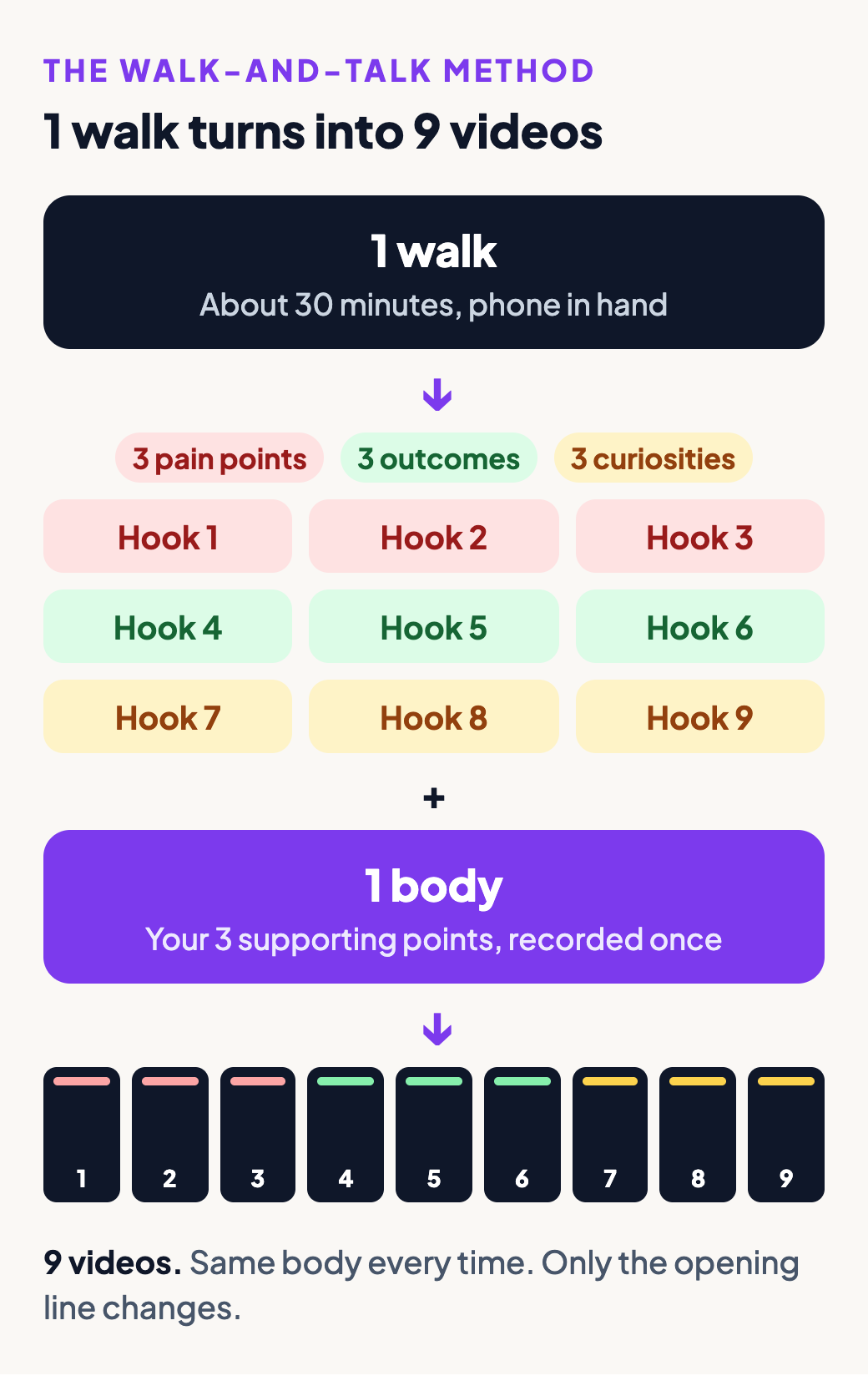
On October 23 I went for one walk and came home with enough footage for 9 videos. I recorded 23 clips, about 30 minutes in total, and Claude did all the cutting. Below is the whole process, including the prompt I pasted.
Why walk-and-talks work
Here are 3 walk-and-talks so you can see the format. Each one passed 800,000 views on TikTok.
@kyleinspires teaches speaking tips on a walk through the snow.
@loginjane takes her followers on an evening walk to the thrift store at the end of her block.
@kelsielynn talks to the camera while she pushes a stroller at sunset.
You’re always moving, so the viewer’s eye keeps moving without flashy edits. Nothing looks over-edited, so the video feels raw and authentic. And you make them during a walk you’d take anyway.
You don’t sit down to record. You go for a walk and come home with videos.
Step 1: Plan 9 hooks before you leave
The walk is the easy part. The plan is what makes one walk turn into 9 videos.
Before you leave, write 9 hooks for one idea. A hook is the first line of your video, and its only job is to make someone stop scrolling. Write 3 of each kind:
- 3 pain points. Name a problem your audience has, in their words.
- 3 desired outcomes. Name something they want.
- 3 curiosities. Name something they’ve always wondered about.
Don’t write them from a blank page. Pick a few of my 100 hook templates and swap in your own topic.
Here are 2 of mine from this walk:
Walk-and-talks like this are the simplest way to blow up your Instagram or TikTok. But if you don’t know how to do them right, you’ll spend forever walking outside with no videos published.
This is the simplest way to turn a 30-minute walk into a recording session.
Step 2: Write one body with 3 points
Next, write the body: everything after the hook. All 9 videos share this one body, so write the body once in this order:
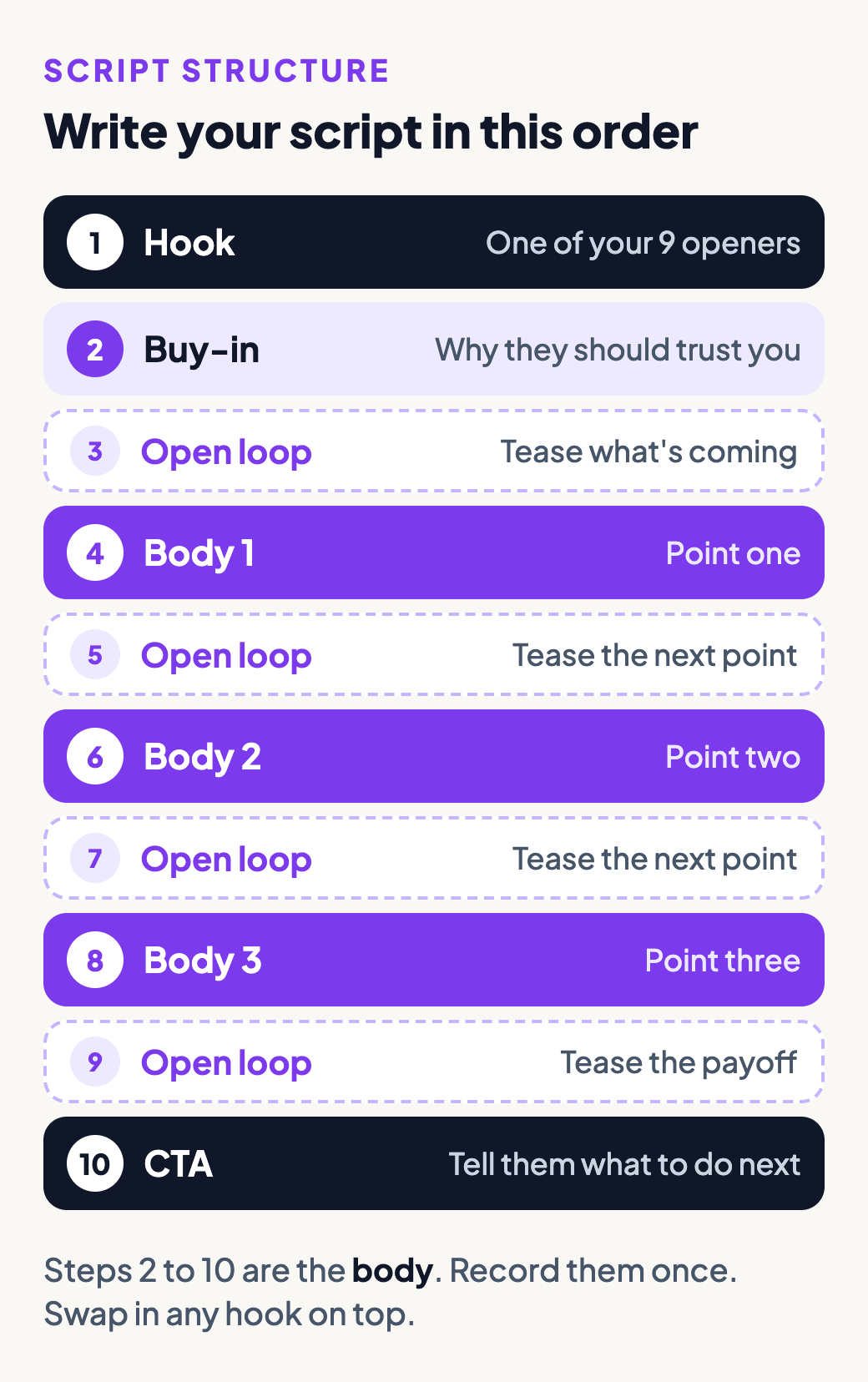
The buy-in tells people why they should keep listening. Mine was “Look at all of these creators who’ve blown up with this simple method,” over a grid of other creators’ walk-and-talks.
An open loop teases what’s coming so people stay for the payoff. Mine was “Once you nail the setup I’m about to show you, content will feel like easy mode.”
Then each of your 3 points gets a short section, with an open loop before the next one. The CTA at the end tells people what to do next, like commenting a word to get a free guide.
Keep your 3 points as short notes. You’ll talk through them in your own words on the walk.
Step 3: Record the hooks, then the body
Put your hooks and notes in your phone’s notes app. Then go walk.
Hold the phone at arm’s length and record each hook as its own clip, one by one. Then record the body.
When you mess up, keep going: say the line again and carry on. Start a fresh clip whenever you want. Retakes cost you nothing, because Claude cuts them out later.
My 23 clips are full of fumbled lines and restarts. I even recorded 2 different bodies on the same walk, and Claude cut versions from both.
Step 4: Let Claude do the cutting
At home, move the clips from your phone to your computer.
Open the Claude desktop app and click the Code tab to use Claude Code, the version of Claude built to work with files on your computer. Set the model to Opus 5.5 and the effort to High. I use the strongest setting for editing because Claude has to catch every bad take.
Drag your clips into the chat, then paste this with your hooks and notes filled in:
I recorded a walk-and-talk video. The clips I added are my raw footage. The first clips are my hooks, one hook per clip. The rest is one body.
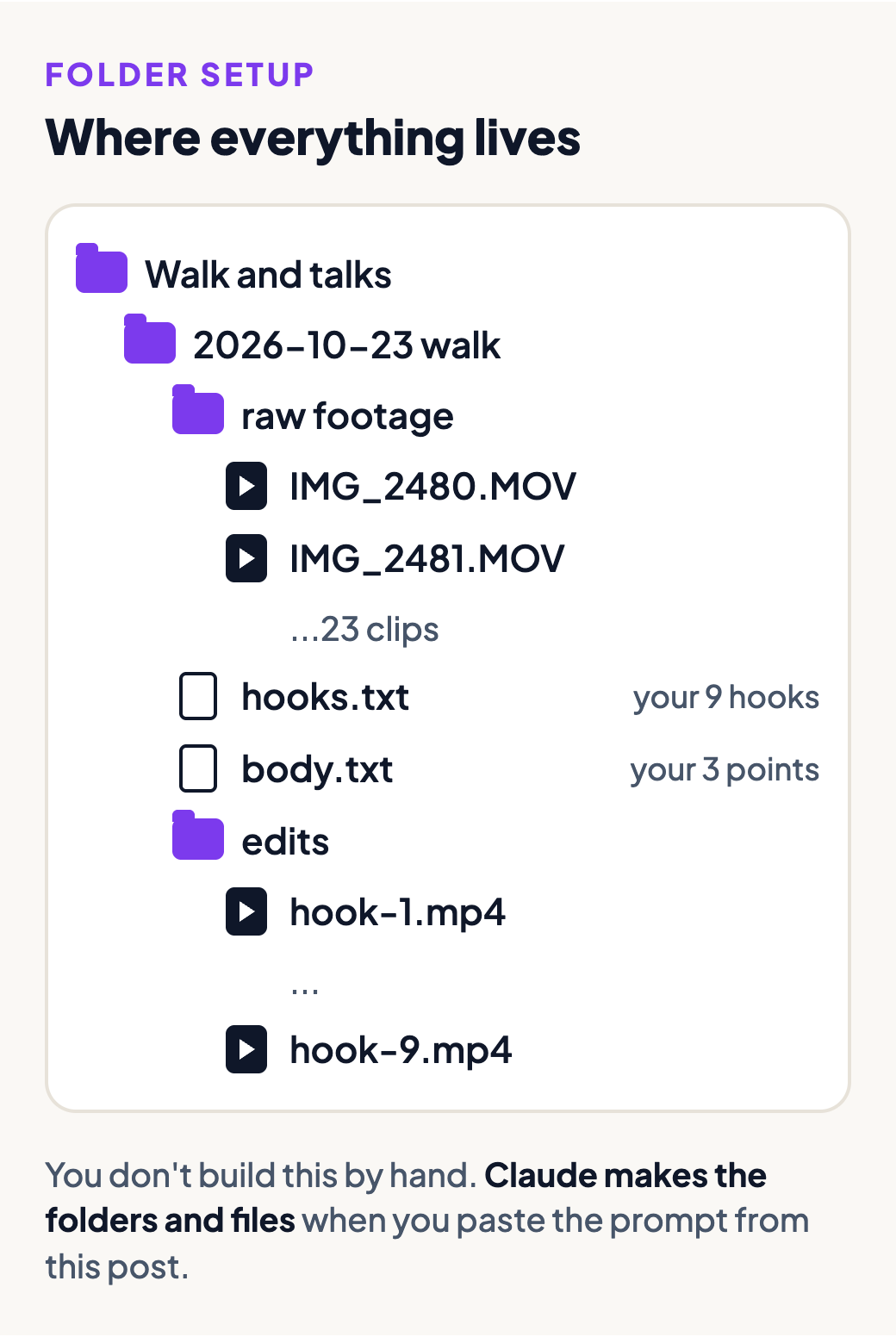
- Make a folder on my Desktop called “Walk and talks.” Inside, make a folder named with today’s date and the word “walk.” Put my clips in a “raw footage” folder inside the dated folder, and save my hooks and body notes there as text files.
- Cut every mistake, repeated line and dead space out of the body so the body plays as one continuous take. When I said a line more than once, keep the last clean version.
- Make one video for each hook: the hook first, then the same body.
- Add captions 2 to 3 words at a time, black text in a white box, low on the screen.
- Save the finished videos in an “edits” folder, named hook-1, hook-2 and so on.
- If you need to install a free tool to do this, ask me first and tell me what the tool does.
- When you’re done, list any line you weren’t sure about.
My hooks: [paste your 9 hooks]
My body notes: [paste your 3 points]
Claude asks before changing anything on your computer. Say yes to the folders. When Claude finishes, your walk folder looks like this:
The cuts get better when Claude already knows your caption style and past videos. I’m building this memory into Melda OS, my content system for creators.
Step 5: Watch each cut and give notes
Claude hands you one cut per hook. Watch each one and write notes with the time in the video, like this:
Hook 3, 0:12. The gap between these 2 lines is too long.
Hook 5, 0:31. Bad take on this sentence, so use the other one.
Paste your notes into the chat. Claude applies them and gives you new cuts. Every version shares the same body, so one fix to the body fixes all 9.
Some hooks won’t land once you hear them out loud. Skip those. From this one walk I ended up with 7 to 9 versions I’d post.
Space them out so your followers don’t see the same body twice in one week. I test mine as Instagram trial reels first. My posting schedule is in How I Turn One Recording Into 18 Videos.
Preston
Get more resources from me
- Work with me to build a content system around your business and your audience.
- Join the Melda OS waitlist for the content system I’m building for creators.
Get a new build-with-AI guide every week
Weekly playbooks on prompting, agents, and content systems — free.
You're in. First email lands shortly.