How I Automate 90% of My Content With CODEX [Full Setup]
![How I Automate 90% of My Content With CODEX [Full Setup]](/images/blog/one-transcript-to-a-week-of-content/cover.png)
Read Time: 16 Minutes
By the end of one 25-minute walkthrough, a single coaching-call transcript had become 6 short-form outlines, an 8-slide carousel, and a complete newsletter draft.
This is the same workflow I used while growing past 750,000 followers across Instagram, TikTok, and YouTube.
None of those drafts went public on the first pass.
I rejected 3 carousel hooks, rewrote the strongest one, added a problem slide, and fixed the newsletter ending. Then I told Codex which corrections should affect future work.
The review loop is the system.
The starter kit gives you the same starting point without my audience, offers, colors, or publishing setup baked into your files.
Get the Codex Content System Starter Kit
After you unzip the folder, Codex walks you through a 2 to 10 minute setup. Answer a few questions or give Codex articles, videos, transcripts, websites, and brand documents you already own.
Then you add one long-form source and choose what you want to make.
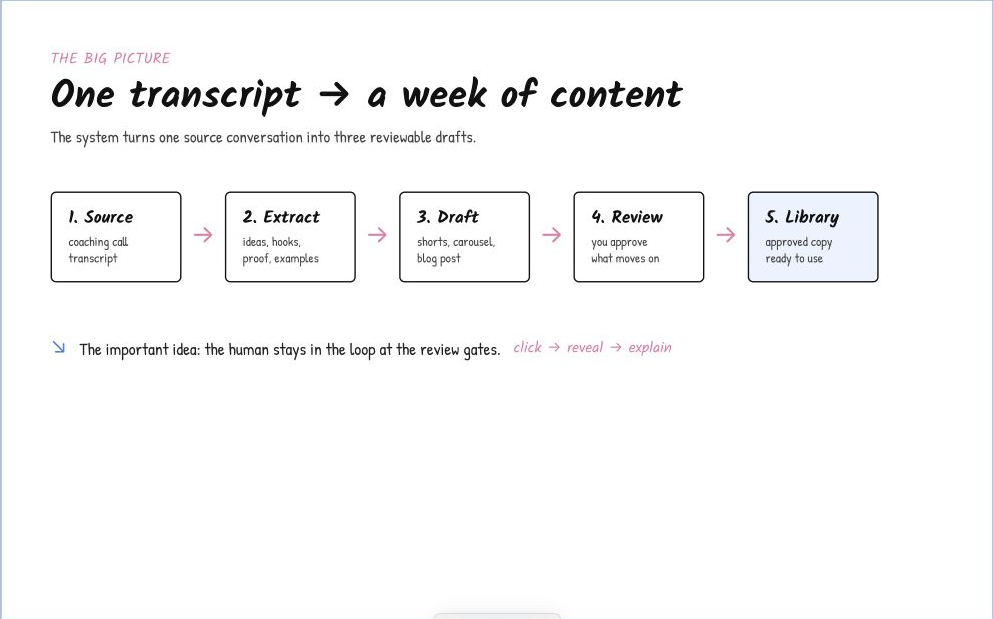
The agent handles the sorting and first draft. You decide what deserves to move forward.
The whole system in five moves
The process starts with something you already said or wrote.
A YouTube video works. So does a podcast, livestream, webinar, coaching call, interview, voice note, or article. A transcript gives Codex the clearest evidence, but plain text and Markdown work too.
Use your own long-form content whenever possible. Your words contain your stories, examples, opinions, and teaching patterns. Another creator’s content gives the system someone else’s voice and creates an obvious copying problem.
Codex then moves through the same 5 jobs I show in the video:
- You give the system one long-form source.
- Codex extracts ideas, hooks, examples, and proof, then shapes them for the format you picked.
- You review the draft and name what feels wrong.
- You decide which corrections apply once and which should become reusable rules.
- You log the approved copy, images, captions, and videos in a system of record.
The downloadable kit prepares the drafts and local files. I explain my private database and publishing layer later in this issue.
This boundary matters. You should learn which drafts are useful before connecting a system to your audience.
Spend 2 to 10 minutes on setup
The video shows my configured version of the folder. My audience, academy link, colors, fonts, images, and carousel rules were already loaded before I recorded.
The download linked here is the generic version I made for viewers. The folder starts without my personal settings, then asks you for yours.
The starter kit now begins with one command:
/setup-content-systemYou choose one of three paths:
- Quick setup asks a few plain-language questions.
- Source-based setup studies material you already created.
- Quick now, improve later saves neutral settings so you begin with one transcript.
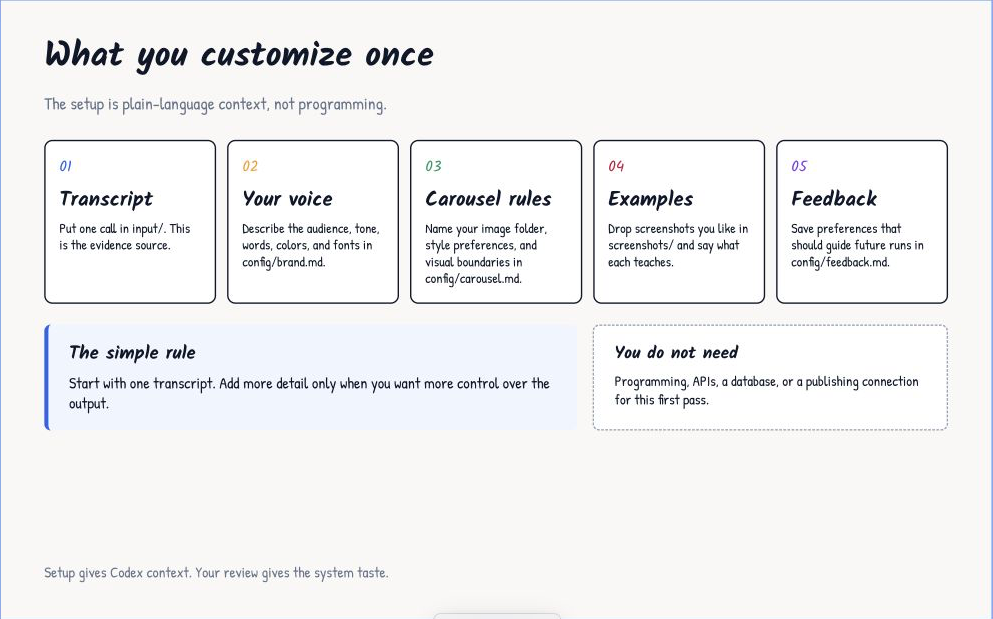
You are giving Codex context, not writing code.
For a quick setup, Codex asks who you help, what result your content should create, how you want to sound, which formats you want, and what a reader should do next.
The source-based path gives Codex stronger evidence. Bring any mix of:
- articles or newsletters you wrote.
- transcripts from your own videos, podcast episodes, calls, or talks.
- your website, YouTube channel, or specific video links.
- an existing brand guide, voice guide, audience document, or content strategy.
- your logo, fonts, color codes, photos, and carousel references.
Codex records the useful answers in config/brand.md and config/carousel.md. The files also list which sources shaped the profile, so you have the evidence later.
Skip anything you do not have. If you only want Shorts, leave the carousel questions for later. If you do not have a promotion or product, Codex leaves the call to action blank instead of inventing one.
If you run a content skill before setup, the skill pauses, walks you through the same questions, and then resumes your original request.
One source becomes three different jobs
A transcript contains several possible lessons, but each format needs a different shape. The kit keeps the 3 jobs separate.
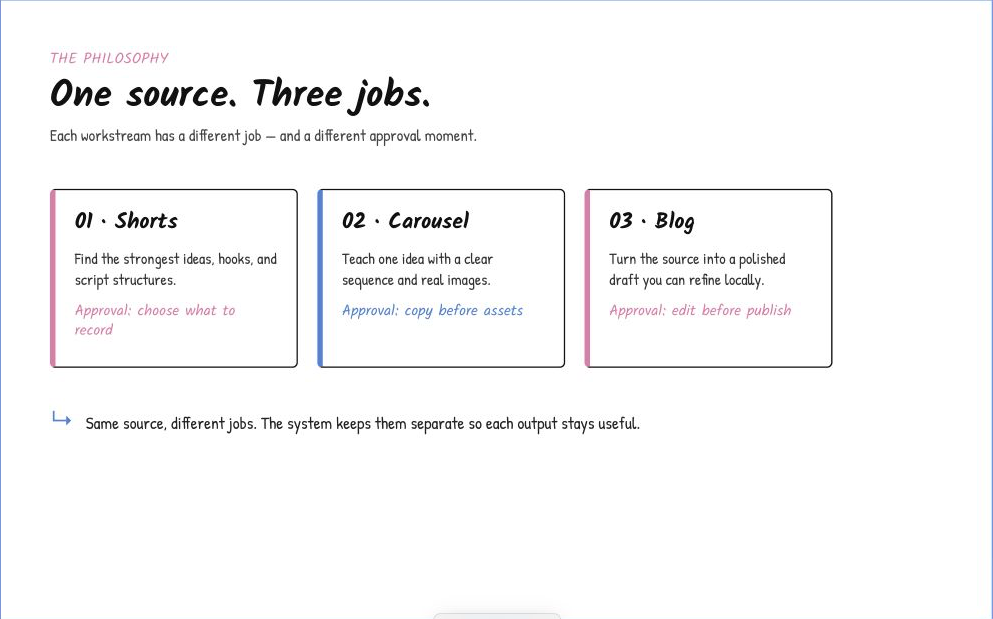
One source feeds three workstreams. Each workstream stops at a different human decision.
Shorts outlines for natural recording
Type:
/transcript-to-clips input/my-transcript.mdThis workflow does not chop a long video into random clips.
Codex reads the full transcript and looks for connected teaching moments. Then Codex creates one review board with up to 6 strong candidates. Weak ideas do not get added to hit a quota.
Each candidate includes a working title, the viewer’s problem, the useful result, source lines, 6 hook options, and a short read-aloud outline.
The kit includes a 102-entry hook library. The library supplies shapes such as a question, list, challenge, story, or contrarian setup. The transcript still supplies the claim. Codex should never paste an admired hook onto a lesson without source support.
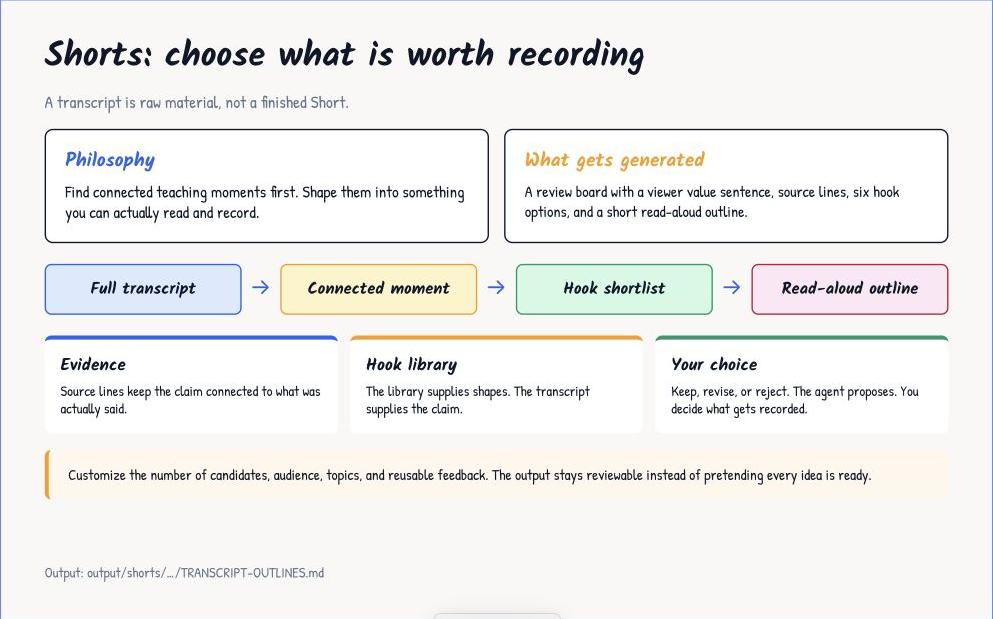
The outline gives you the beats to hit without forcing you to read a stiff word-for-word script.
You review the candidates in one file:
output/shorts/<run>/TRANSCRIPT-OUTLINES.mdThen reply with decisions such as:
KEEP LS02
REVISE LS04
REJECT LS06
In my test, I used the outlines to record 5 talking-head videos in about 45 minutes. I still spoke in my own words. The outline kept the value, hook, and order clear while I recorded.
The video also shows Melda as a browser-based option for this job. The starter ZIP uses the local Codex workflow, so your sources, rules, and drafts stay together in one folder.
Carousel copy before design
Type:
/transcript-to-carousel input/my-transcript.mdThe first pass contains words only. Codex proposes 3 source-grounded angles with hook options and copy for up to 8 slides.
In the video, I picked the third angle about sounding more conversational. I rejected the first 3 hooks because one felt flat, one revealed my CQE framework too early, and one assumed the reader already cared about “follow-up questions.”
I replaced them with a simpler outcome: The secret to sounding more conversational and casual.
The draft also jumped into the tactic too fast. I added a slide about the common mistake: people ask several questions in a row because silence feels uncomfortable, which makes the conversation feel like an interview.
Codex revised the current carousel and saved broader hook and slide rules for the next one.
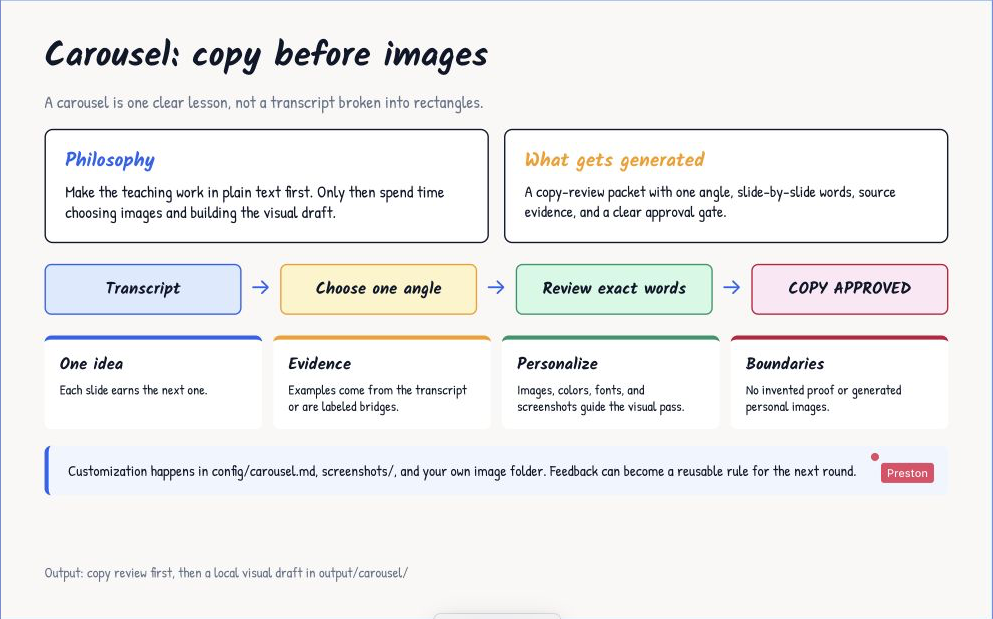
Approve the words before design gets a chance to hide a weak lesson.
After copy approval, Codex reads your image folder, carousel settings, and screenshots. The video shows me adding 2 photos, approving the visual plan, and waiting about 5 minutes for the numbered slides.
I also show earlier versions from past runs. One cover had too much text. Another used a faded image and a dark block behind the title, so the photo lost its impact.
I turned those reactions into visual rules: simplify the cover, protect contrast, and keep the real background visible when the image supports the text.
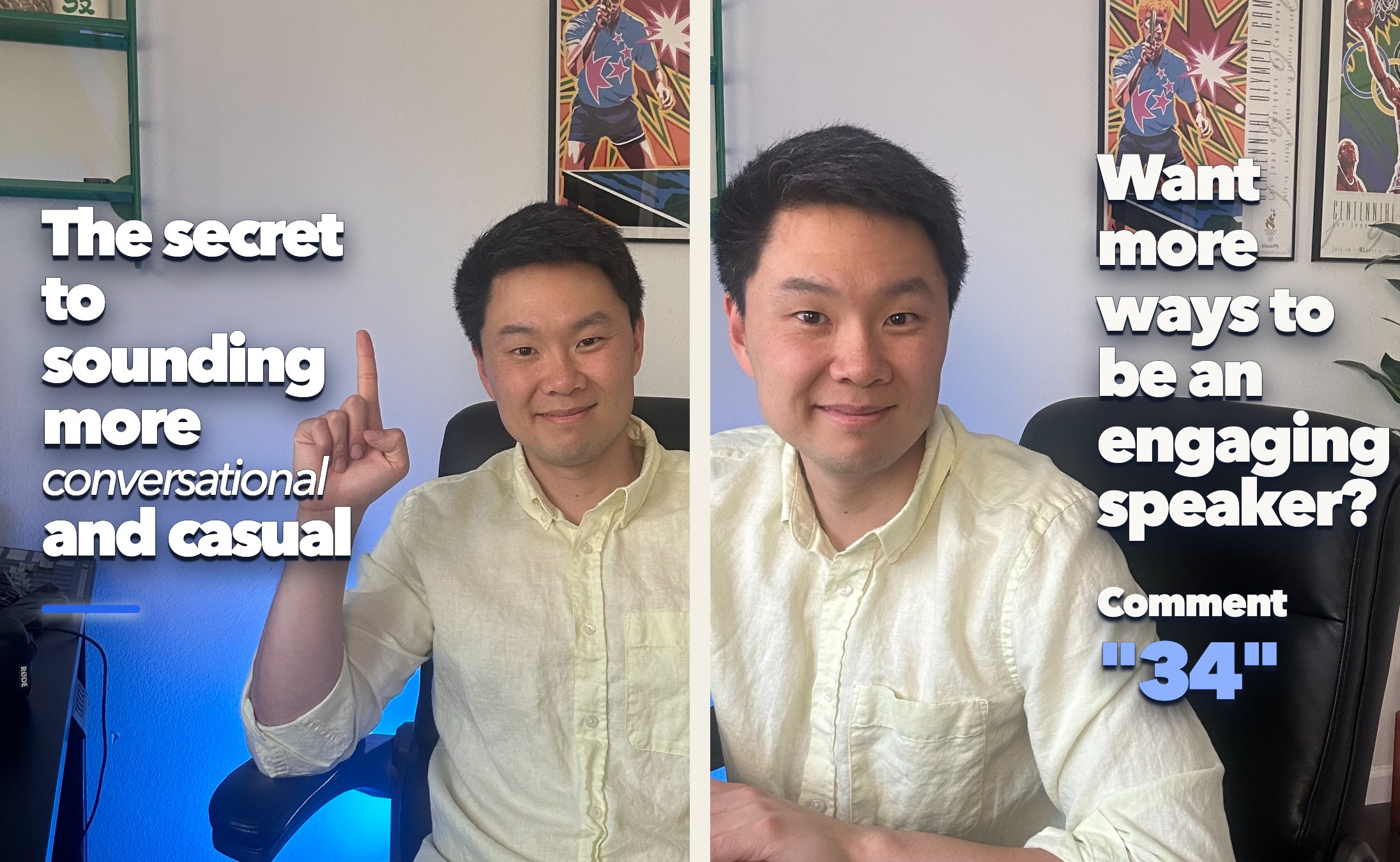
The final cover keeps the words readable without hiding the photo behind a large dark block.
Those choices now live as an optional portrait preset. They are not forced onto everyone.
The reusable rules stay broad:
- show the actual images before asking for approval.
- protect the person’s face, hands, body, and gesture when cropping.
- keep one idea on each slide.
- use real screenshots and proof instead of recreating them.
- never invent a face, metric, testimonial, offer, link, or comment keyword.
When you approve the images, Codex builds a local HTML carousel and renders numbered PNG files.
A blog draft before an email
Type:
/transcript-to-blog input/my-transcript.mdCodex finds one reader problem instead of summarizing every topic in the transcript.
The draft keeps a real source moment when the moment helps the reader understand the lesson. The next section connects the moment to the reader’s problem, teaches the useful moves, and ends without repeating the article in different words.
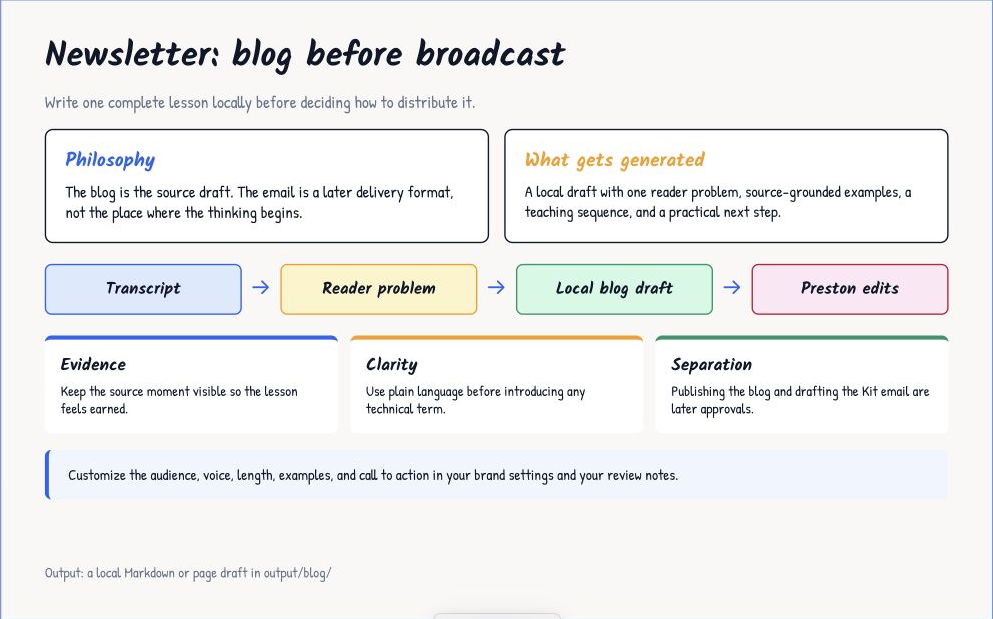
The local blog is the source draft. An email is a later delivery choice.
The first draft in my video took less than 2 minutes. The article used the real client exchange, pulled out the main tactics, and gave each part of the answer a clear shape.
I made one correction. The ending repeated the article instead of giving the reader a next step, so I asked Codex to end with a direct invitation to The Impromptu Speakers Academy and save the preference for future newsletter issues.
Your version reads your brand profile and saved feedback. If you configured a real call to action, Codex uses the destination when the article supports the offer. If you did not configure one, the skill ends on an earned final point or asks what you want the reader to do.
The output stays on your computer:
output/blog/<run>/draft.mdEdit the Markdown file or bring the copy into your own website. The starter kit does not publish the article, create an email broadcast, or send anything to your list.
Feedback gives the system taste
The first draft will not match your preferences every time. Name what feels wrong, say what you want instead, and decide whether the correction belongs to this draft or future work.
Run:
/improve <your feedback>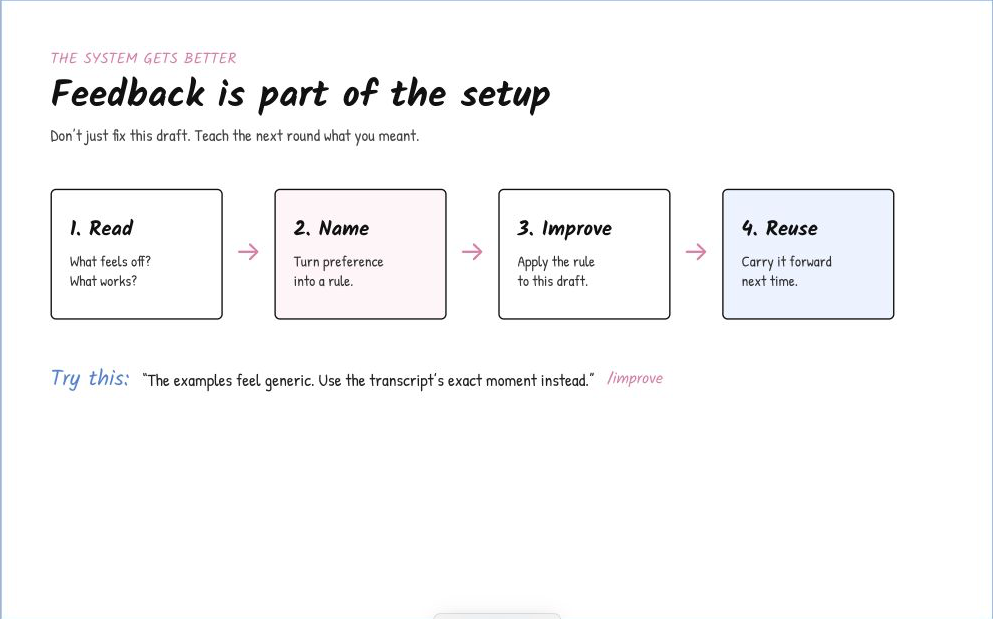
Read the draft, name the problem, apply the correction, and reuse the rule only when you want the rule to carry forward.
This distinction stops one unusual draft from turning into a bad permanent rule.
The skill stores approved preferences in config/feedback.md. Brand preferences stay in your config. Reusable workflow lessons belong in the skill.
What happens after I approve a draft
The account-specific layer begins after the work looks right.
In the video, I ask Codex to add the finished carousel to my content engine. About 3 minutes later, Codex creates row C3297 in my Google Sheet and links the approved copy, a Drive folder with every slide, and a finished Instagram caption.
My newsletter workflow follows the same pattern. Codex adds the article and cover to my website, then creates an unsent Kit broadcast for me to review before anything reaches my 12,000 email subscribers.
Those automations depend on my database, site, Drive, and Kit account. The public ZIP stops at organized local drafts because nobody should inherit my credentials or publishing rules.
What the ZIP gives you
The download includes 5 skills:
- guided first-run setup.
- transcript to Shorts outlines.
- transcript to carousel.
- transcript to blog.
- improve the next round.
You also get the 102-entry hook library, hook checks, a local carousel renderer, blank input and output folders, config templates, and example review packets.
The example packets show the expected shape of the work. Codex is told not to use their brand voice, calls to action, or visual rules as your settings.
The video points out the 5 folders you need to understand first:
input/       your transcript and personal images
output/      the drafts Codex creates
skills/      the five reusable workflows
config/      your voice, visuals, and feedback
screenshots/ carousel styles you want Codex to study
The reference/, helpers/, and help/ folders hold the hook library, local checks, renderer, examples, and setup guide. You do not need to edit them for your first run.
The ZIP does not contain my private database credentials, Google Drive setup, publishing accounts, email access, B-roll library, client data, or API keys.
Your first run
- Download the ZIP, unzip the folder, and move the folder to your Desktop.
- Open Codex, click the plus sign next to Projects, and choose Local project.
- Select the downloaded folder, create the project, and open a new task.
- Run
/setup-content-system, then place one transcript ininput/. - Choose a content skill and use
/improveafter you review the first draft.
Run all 3 production skills and the same source becomes a Shorts board, carousel packet, and blog draft.
Download the Codex Content System Starter Kit
If you want the database, website, email, Drive, and publishing layers connected around your own workflow, book a call to work with me.
Preston
Get a new build-with-AI guide every week
Weekly playbooks on prompting, agents, and content systems — free.
You're in. First email lands shortly.