Build Your Content Research Assistant With Codex
Read Time: 9 Minutes
One caveat before you build: this guide recommends a ChatGPT Site. ChatGPT Sites is currently a beta feature on Plus, Pro, Business, Enterprise, and Edu plans. A new Site starts restricted to its owner and workspace administrators. Keep this project owner-only and open the project through the ChatGPT account that created the Site. Changing the access setting makes a Site shared or public. Read OpenAI’s current Sites guide.
Claude Code cannot create or host a ChatGPT Site. Claude Code builds a separate custom web app instead, which requires another host and an authentication setup. Expect differences in the interface and results. I recommend Codex in ChatGPT with Sites for the version in this guide.
Give this system a list of creator handles. It should return up to 10 distinct videos worth studying, with the source proof and analysis attached.
That is the benefit in one sentence.
The problem it solves is research by endless scrolling. Saved posts are scattered across feeds and folders. You cannot compare them, search the spoken words, or tell whether a popular video was truly unusual for that creator.
You should not have to collect view counts, name files, calculate medians, or clean transcripts. Your job is to choose the niche and creators. The system should handle the rest.
By the end of this guide, you’ll have a system for finding outlier videos in your niche and researching why they earned more views. You’ll use those patterns to develop your own videos with a stronger starting point and a better chance of reaching more people. No system guarantees virality.
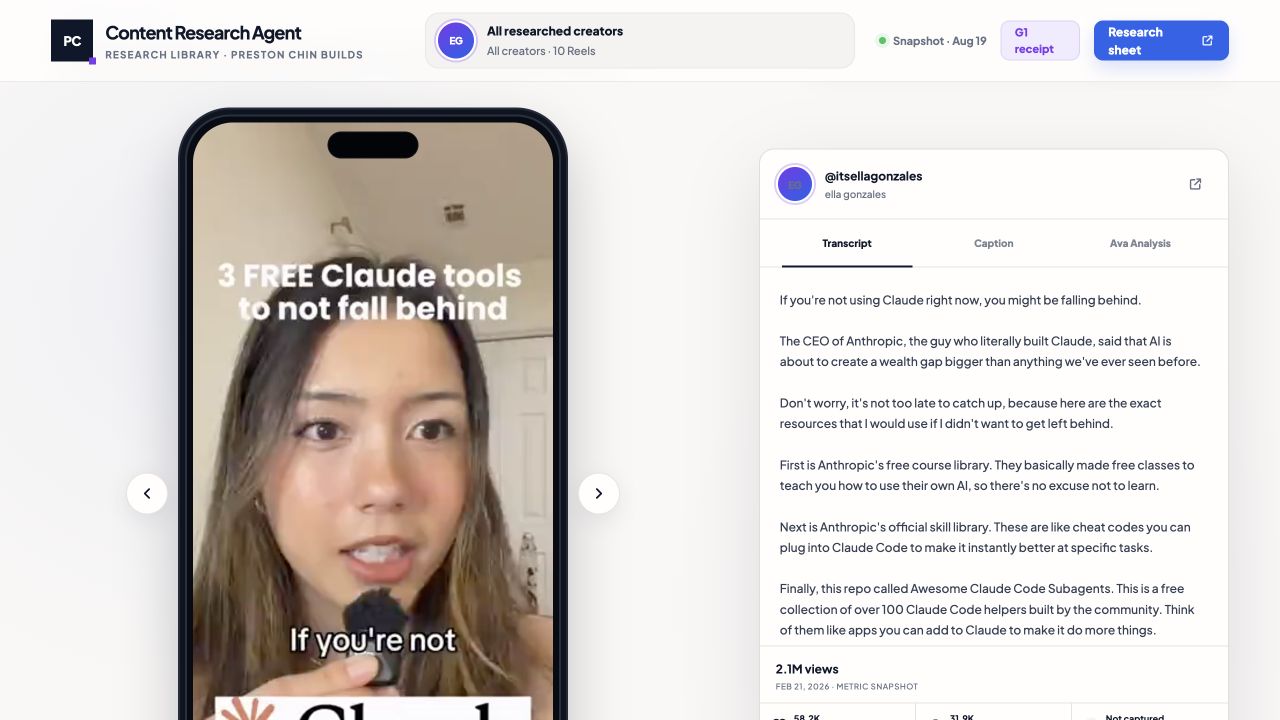 The transcript stays beside the video, so you’ll check the words against the delivery without reopening the feed.
What you need before you start
You need 2 paid tools.
First, use Codex in ChatGPT with Sites access. I recommend budgeting at least $100 per month across your ChatGPT plan and credits for this type of work. Check the current Codex plans before subscribing.
Claude Code is the alternative if you want a separately hosted custom site. Use the $100-per-month Max 5x plan, then ask Claude Code to propose the host and private sign-in setup before deployment. Check the current Claude plans. You don’t need both coding agents.
Second, get Scrape Creators API access. Its current public offer is $47 for 25,000 non-expiring credits. Check the current Scrape Creators pricing before you buy because prices and endpoint costs change.
You also need the creator handles you want to study. ChatGPT Sites handles the hosting workflow for the recommended version. If you use Claude Code, approve its separate hosting and authentication plan before anything goes live.
The real 10-video sample
I built the first version around 10 archived Instagram videos from nine creator accounts.
These are the actual sources from that sample, with the view counts captured on August 19, 2026:
@itsellagonzales: 2,088,124 views, using Claude before falling behind@jens.heitmann: 1,320,022 views, Claude Code as a social media manager@onlyzita: 297,105 views, what to do before posting content@luibaarde: 1,032,818 views, storytelling structures for content@andresrtags: 218,746 views, five content pillars@nateherkai: 3,342,639 views, YouTube Shorts that post themselves@automatewithmarko: 433,478 views, building a carousel with AI@jasoncooperson: 459,923 views, predicting what to post@jlee.mov: 103,854 views, reverse-engineering competitors@jasoncooperson: 766,237 views, replacing manual content research
This sample proved the review experience: video, transcript, source, metrics, and analysis in one place. It did not prove that all 10 were outliers. That requires a real baseline for each creator.
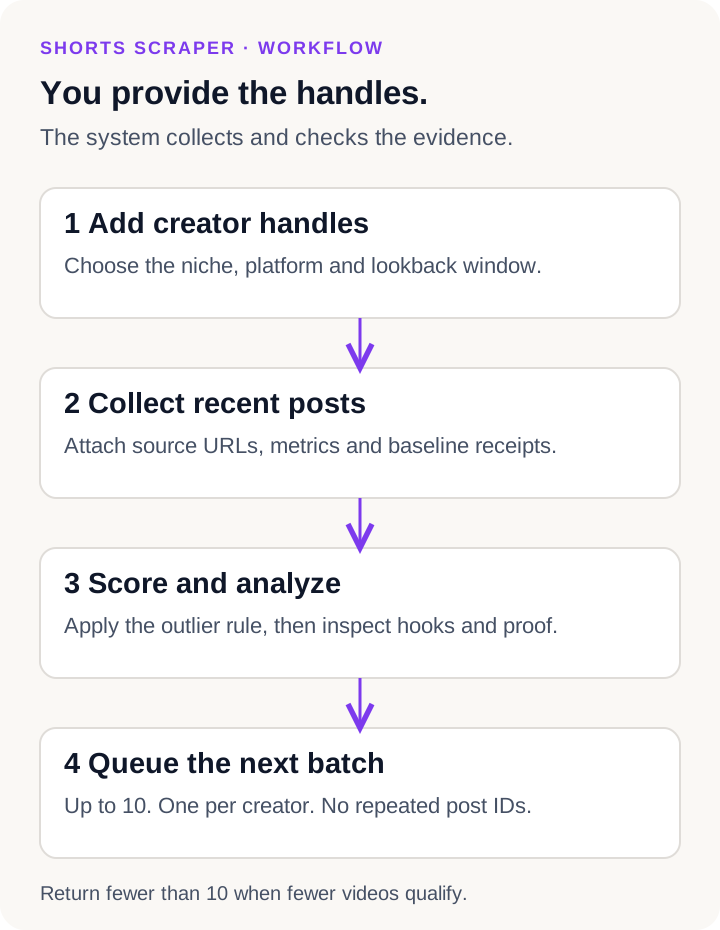 You provide the handles and settings. The system collects the records, applies the rules, and queues a varied batch.
1. Start with creator handles
Give the agent a niche, a platform, a list of handles, a starting lookback window, and the number of competitor videos you want each day from 1 to 10.
For a communications library, a practical 10-account seed list from my existing research would be:
@lorraineklee, @jefferson_fisher, @askvinh, @vvanedwards, @shadezahrai, @thefbinegotiator, @thinkfasttalksmart, @speakingwithyasir, @masteryourtalk, and @speechprof.
The agent should validate every handle before spending credits. More creators give you more variety. Ten is a useful starting point because the app can return one result per creator.
Use 30 days as the starting window. When the system runs out of unseen outliers there, it should search days 31 through 60, then days 61 through 90, and keep moving backward without recycling videos.
2. Let the system attach the evidence
“Evidence” sounds like extra work for the user. It should happen automatically.
You provide the handles. The collector should attach a receipt to every candidate with:
- Creator, platform, post ID, and source URL
- Published date and capture time
- Followers, views, and the engagement counts the provider actually returns
- The 10 comparison-post view counts
- The median, calculated ratios, and qualification rule
- Caption, transcript, and media reference when available
- Credits used and any missing fields
This receipt makes the result reproducible. It also prevents a missing metric from silently becoming zero.
3. Define an outlier clearly
A raw view count is a weak comparison. A million views means something different for a creator who usually gets 20,000 than it does for a creator who usually gets 800,000.
Use the creator’s own recent performance as the main baseline:
- Under 200,000 followers: qualify a video when it reaches at least 5 times the follower count, or 5 times the median of the creator’s latest 10 other videos.
- At 200,000 followers or more: require at least 2 times the median of the creator’s latest 10 other videos.
4. Connect Scrape Creators
Scrape Creators is the data provider I designed this around. Its API can return public profile and post data as JSON. The current documentation uses an x-api-key header and shows the credit charge in the response. Read the official API documentation.
Set it up in this order:
- Create an account and copy your API key from the dashboard.
- Ask the coding agent to show you the private environment-secret setting for your host.
- Paste the key there, not into chat, browser code, a screenshot, or the repository.
- Test one validated creator handle.
- Compare the returned handle, post URL, and counts with the public source.
- Set a credit cap before requesting the full batch.
The provider currently lists 25,000 non-expiring credits for $47. Prices and endpoint charges can change, so check the dashboard before buying. Many common endpoints cost one credit per request, while some options cost more.
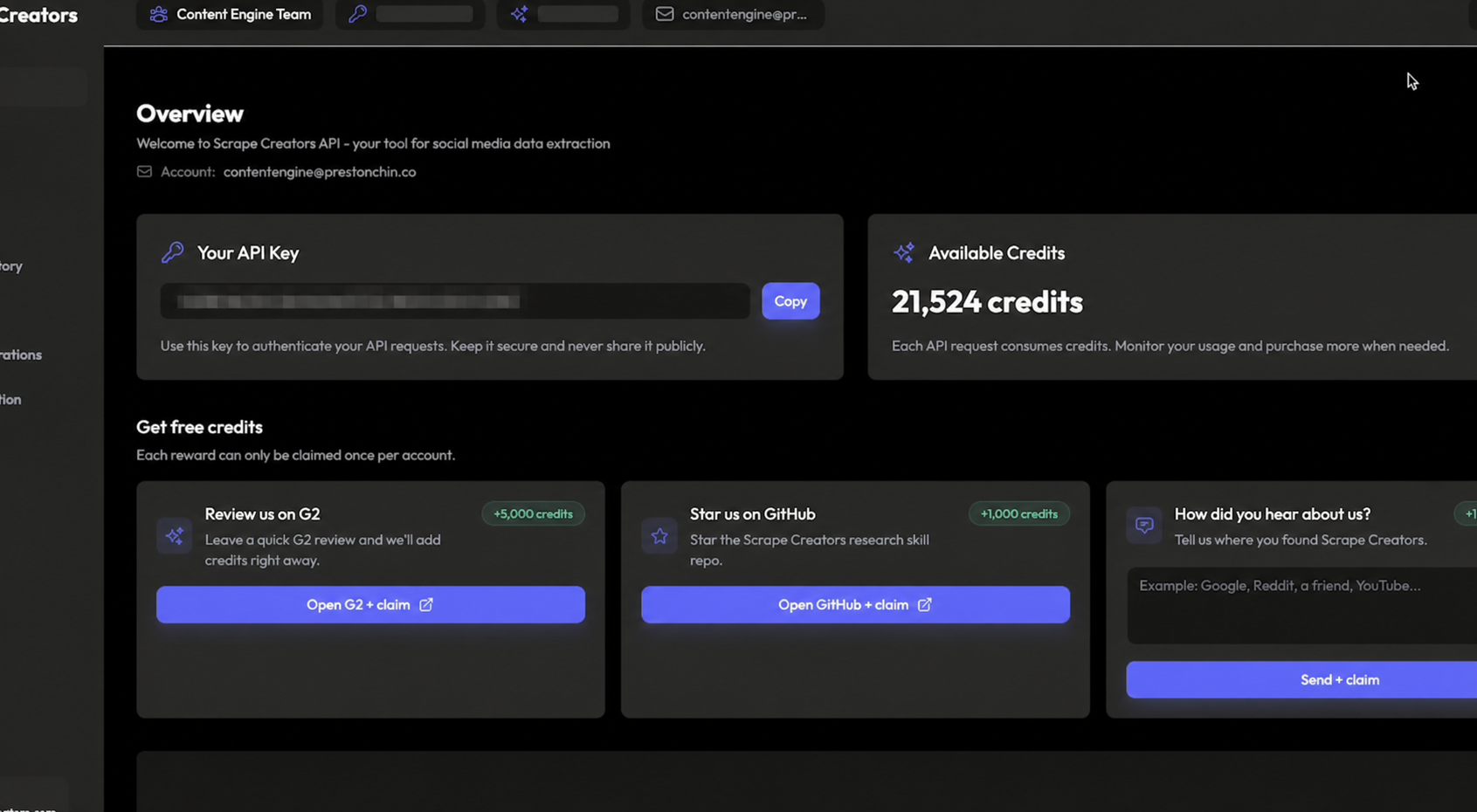 I blurred the API key in this screenshot. Keep your own key out of screenshots, chats, browser code, and version control.
5. Analyze what made the video useful
The transcript should be generated under the hood when the source allows it. You should not have to correct it manually. The app can mark uncertain words and keep moving.
The analysis should separate:
- The first frame and on-screen hook
- The first spoken line
- What changes during the first 6 seconds
- The sequence of teaching beats
- The proof shown on screen
- The CTA and its promise
- A reusable structure without copying the creator’s wording
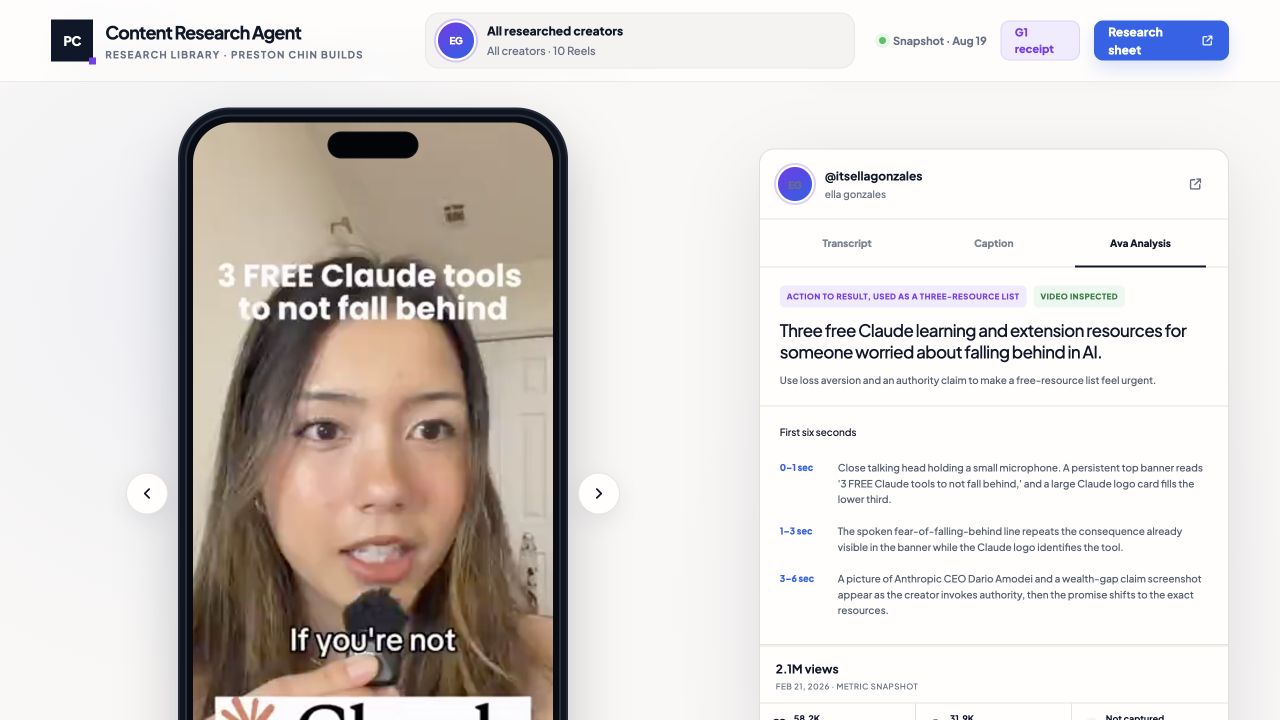 The analysis explains the visual and spoken beats. The claim-risk field records what the source does not prove.
6. Queue the next batch without repeats
The page should have a Get the next batch button.
Each click should:
- Read the saved creator handles, starting window, and Videos per day setting from 1 to 10.
- Remove every post ID or canonical URL already seen.
- Search the newest 30-day window first, then move backward in 30-day windows when the current window runs out of unseen outliers.
- Rank qualified outliers by creator-relative performance.
- Fill any remaining slots with the strongest unseen videos and label them best available, not a verified outlier.
- Keep no more than one video per creator for that review day and preserve variety across topics, hooks, and formats.
- Confirm every selected video plays inside the page and already has its transcript and analysis.
- Queue the finished batch for the next day unless you ask for an earlier date or time.
You should never choose which videos get embedded or transcribed. The system selects and prepares them before the scheduled reveal.
Keep collection button-triggered. A complete test means one click retrieves, filters, saves, embeds, transcribes, analyzes, queues, and reveals at least one prepared result at the scheduled time. A loading animation alone is not proof.
Copy this prompt into your coding agent
Open a new project in a file-capable coding assistant such as Codex or Claude Code. Paste the full prompt below.
You are my Shorts Research Builder. Build a private, single-owner app that turns a list of creator handles into a small, evidence-backed batch of short-form videos worth studying.

Use ChatGPT Sites as the preferred hosting path when this prompt runs in ChatGPT with Sites access. Keep the Site restricted to its owner, plus workspace administrators when applicable. Do not widen access unless I ask. If you are running in Claude Code, tell me you cannot create or host a ChatGPT Site. Offer a separately hosted custom site only after I approve its hosting and authentication plan, and warn me that its setup and results may differ.

I should only need to provide:
- my niche and the decision this research should help me make
- the platform
- creator handles or profile URLs
- a starting lookback window, defaulting to the last 30 days
- a daily batch size from 1 to 10

Ask for those inputs in plain language. Do not ask me to create folders, name technical files, collect metrics, calculate medians, or correct transcripts. Handle that work inside the build.

Use this workflow:

1. VERIFY THE SETUP
Inspect the tools available to you. Confirm whether ChatGPT Sites is available for this build. When available, keep the new Site owner-only. When unavailable, explain the separate hosting and authentication required before building. Use a documented public-data provider such as Scrape Creators only after one live request succeeds. Show me where to save the API key as a private environment secret. Never ask me to paste the key into chat, browser code, screenshots, or the repository. Before a larger run, estimate the requests and credits, set a spending cap, and ask for approval.

2. COLLECT THE SOURCE DATA
Validate every handle before collecting. Pull the recent posts needed for the selected lookback and outlier comparison. Start with the newest saved window. When all unseen outlier options in that window are exhausted, search the next older non-overlapping 30-day window, then keep moving backward 30 days at a time until the requested batch is ready, the source history ends, or the approved spending cap is reached. Never restart the same time window to recycle candidates. I provide the handles; you create the evidence receipts automatically. For every candidate, preserve the platform, creator, post ID, canonical URL, published date, capture time, follower count, views, available engagement counts, caption, media or allowed playback reference, and the provider's credit charge. Leave unavailable values blank. Never estimate them.

3. APPLY THE OUTLIER RULE
Use the creator's own performance as the main comparison.
- Under 200,000 followers: qualify a candidate when its views are at least 5 times the creator's follower count OR at least 5 times the median views of the creator's latest 10 other eligible videos.
- At 200,000 followers or more: ignore the follower ratio and require at least 2 times the median views of the creator's latest 10 other eligible videos.

Exclude the candidate from its own baseline. Save all 10 baseline values, the sorted values, the median, both calculated ratios, and the exact rule that passed. If the required follower count, views, or 10-post baseline is missing, label the result "insufficient evidence." Do not call it an outlier.

4. SELECT A VARIED BATCH
Let me set a saved daily batch size from 1 to 10 and change it at any time. Fill each batch with unseen qualified outliers first. Rank them by creator-relative outlier ratio, then preserve variety across creators, topics, hooks, and formats. Select no more than one video from the same creator in one run or review day. Deduplicate against all prior results using platform plus post ID, with canonical URL as a fallback. Never return the same post twice. If the expanded search finds fewer qualified outliers than requested, fill the remaining slots with the strongest unseen videos available and label each one "best available, not a verified outlier." Return fewer only when no more unseen, playable, transcribable videos are available within the source history or approved spending cap.

5. ANALYZE EACH RESULT
Prepare every selected video before revealing the batch. Confirm that the video plays inside the review page through an approved embed or permitted local playback copy. Generate or retrieve its timestamped transcript and analysis under the hood. If a selected video cannot be played or transcribed, replace it with the next eligible candidate. Never ask me to choose which videos to transcribe or embed. Mark uncertain words instead of asking me to clean the transcript manually. Analyze the first spoken line, on-screen hook, first visual, first 6 seconds, structure, angle, proof, CTA, pacing, and reusable pattern. Tie every observation to the source record and timestamps or frames when available. Separate observation from interpretation.

6. BUILD THE REVIEW PAGE
Create a searchable page with creator filters, source links, embedded playback, transcript, analysis, captured metrics, outlier math, missing-data labels, and previous/next controls. Add a saved integer control labeled "Videos per day" with a minimum of 1 and maximum of 10. Add a button labeled "Get the next batch." When clicked, it should use the saved daily batch size, handles, and lookback rules, remove anything already seen, prepare each selected video completely, and queue the finished batch for the next local calendar day at the saved review time. If I explicitly request an earlier date or time, use that override for this batch. Otherwise, do not reveal the new batch on the same day. Show the queued reveal time, progress, credits used, candidates checked, accepted count, fallback count, rejection reasons, errors, and last-run time.

Keep collection button-triggered. Do not create an automatic recurring daily run. Each click prepares one complete batch and schedules its reveal for the next day unless I ask for it sooner. A complete test means one click retrieves, filters, saves, embeds, transcribes, analyzes, queues, and then reveals at least one prepared result at the scheduled time. Respect platform terms and creators' rights. Do not promise virality or leads.

Start by asking me for the five plain-language inputs listed above.
The prompt gives the agent the mechanics and the guardrails. You still approve the creators, the spend, and the first live test.
Once the first batch appears, pick one repeated pattern and decide how you will test it in your own content.
If you want me to build a content research system like this around your niche and publishing workflow, fill out this 90-second form. I read every submission and will get back to you personally if it’s a fit.
Preston
Get a new build-with-AI guide every week
Weekly playbooks on prompting, agents, and content systems — free.
You're in. First email lands shortly.